SaaS security and access reviews
See every account in every SaaS tool you connect, with its MFA, role and owner. Then run access reviews and approve access requests, and keep the proof for your audit.
- Reads accounts from
- Google Workspace, Microsoft Entra ID, Okta, Slack, GitHub, AWS IAM and more
- Access reviews
- Any period you choose, such as every quarter
- Counts toward
- SOC 2, ISO 27001, PCI DSS, NIST CSF, HIPAA and CCPA
Last checked November 24, 2026Read as Markdown
How do I check accounts and access from my AI agent?
Ask your agent who has access to what. It reads the same accounts, reviews and requests you see under SaaS Security.
| MCP tool | Access | What you use it for |
|---|---|---|
| list_saas_accounts | Read | Every account in every connected tool, with status, admin role, MFA, last sign-in, owner and service account mark. |
| list_access_reviews | Read | Your access reviews, their period and state, and what reviewers kept or revoked. |
| list_access_requests | Read | Access requests and recorded grants, with who approved each one and how. |
| list_lifecycle_checklists | Read | Onboarding and offboarding checklists, including access a leaver still has. |
Try these prompts
- Which active accounts still have no MFA?
- Which accounts have no owner?
- What did our last access review revoke?
- Which access requests are still waiting for a decision?
- Which offboardings still have access that is not removed?
What your agent gets back. Counts first, such as accounts without MFA and accounts with no owner, then one row per account. A tool Strac Comply could not read is named, so an empty answer is never a silent gap.
Connect your agent first.
How do I run an access review in the dashboard?
Connect your identity provider and your main tools first. Then every account shows up in one list.
Admin
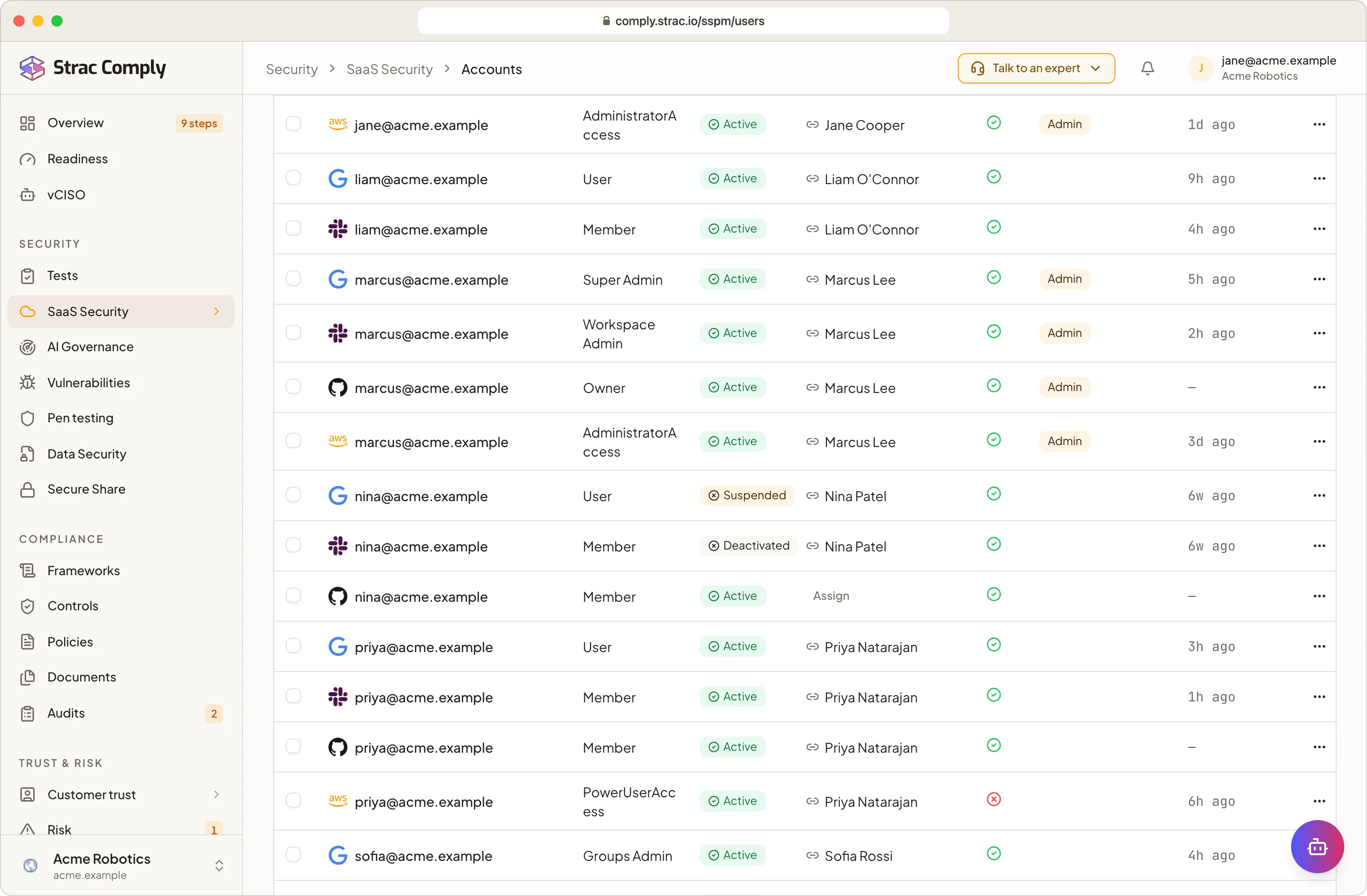
Step 1: See every account
Open SaaS Security > Accounts. Filter by MFA or Owner. Use Assign owner or Mark as service account on a row.
Admin
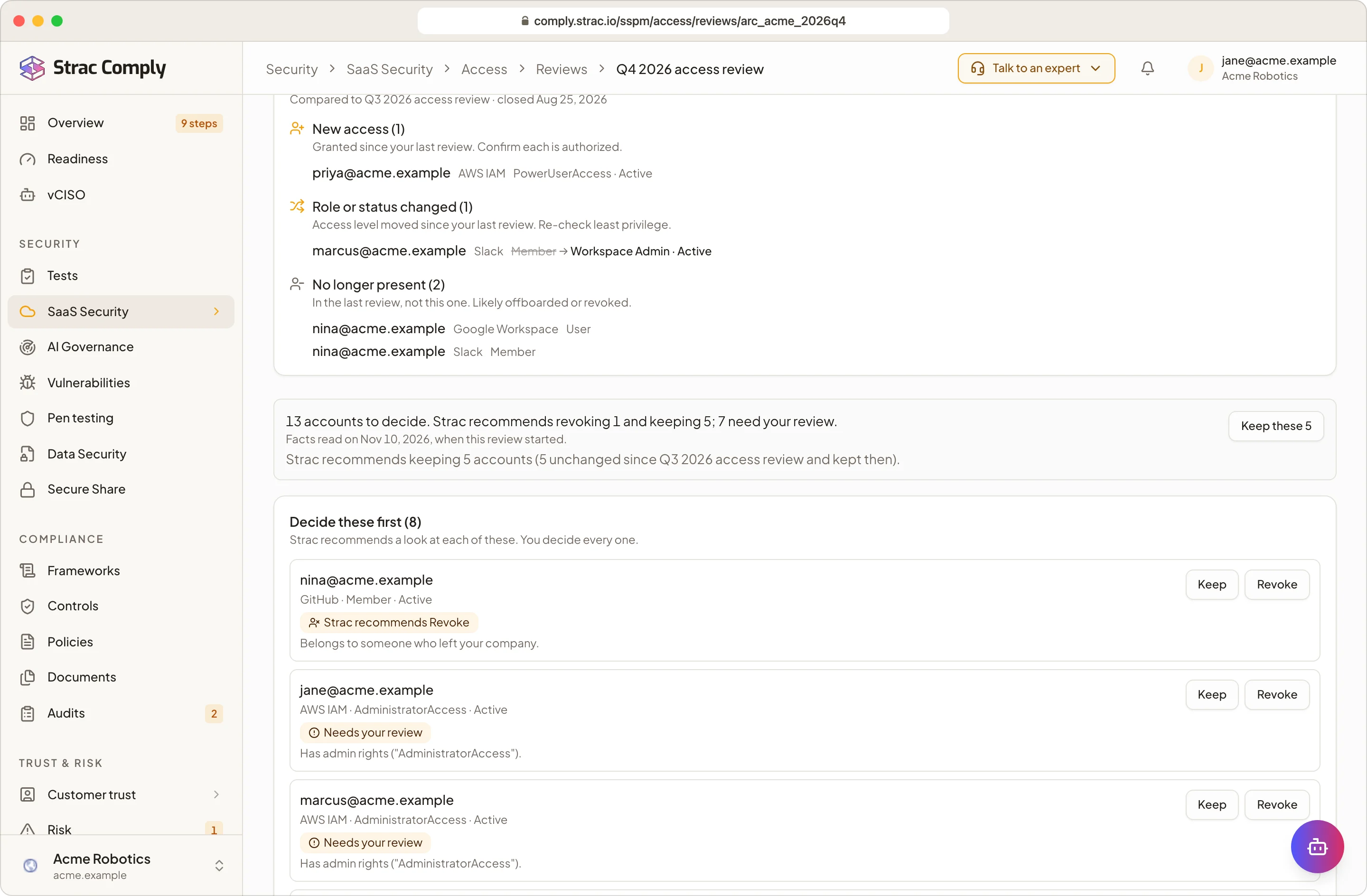
Step 2: Start an access review
Open SaaS Security > Access and click Start access review. Reviewers keep or revoke each account.
Employee
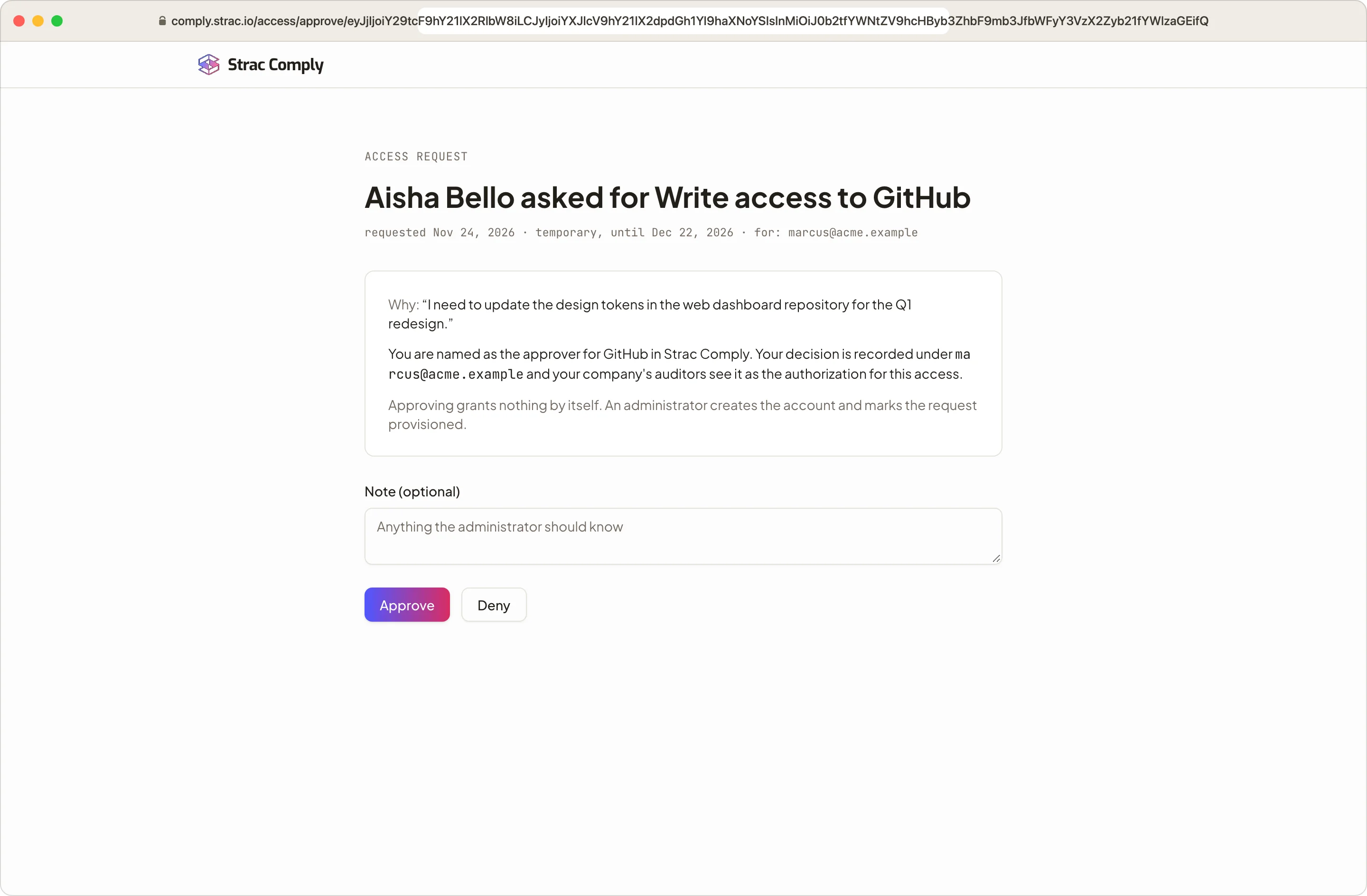
Step 3: Approve new access
A member clicks Request access. An approver without an account gets an email link to approve or deny it.
Strac Comply suggests Keep, Revoke or Needs review for each account, with the reason. A reviewer always decides. Close a review of accounts, and Strac Comply files the signed-off result as evidence. Export evidence gives you a copy.
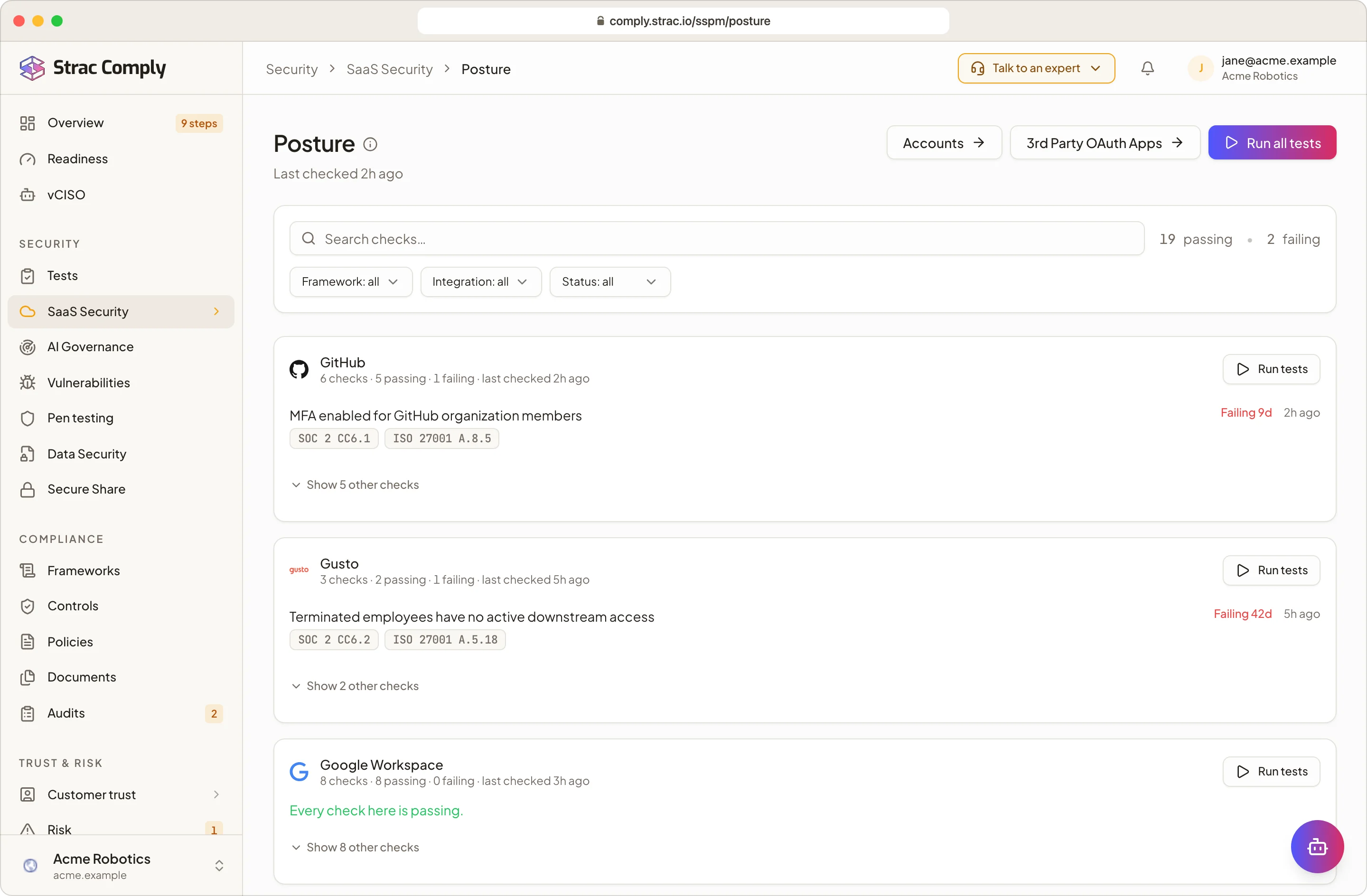
SaaS Security > Posture groups the setting checks for each app. Open a failing check to see where to fix it in the app's own admin console.
What does it check on each account?
These are the facts you see for every account, and the questions they answer for your auditor.
| Check | What you see | Why it matters |
|---|---|---|
| MFA | Enabled, Disabled, or Unknown when the tool does not report it | Accounts without MFA are the most common access finding. |
| Admin role | Which accounts hold admin rights in each tool | Admin access needs the closest review. |
| Owner | The person or team behind each account, or No owner | Every account needs someone who answers for it. |
| Service account | Marked by you, reported by the tool, or detected for you to confirm | A service account is reviewed as one, not as a person. |
| Activity | Signed in recently, Inactive or Never signed in | Unused accounts are access nobody needs. |
| People who left | Accounts that still work after the person left | Access must end when employment ends. |
| Status | Active, Invited, Suspended or Deactivated | An invite is access too, once it is accepted. |
Strac Comply learns who left from your HR system, your offboarding checklists and the people an admin marks as gone.
Your account tools also run automated tests, such as MFA enforcement. The integrations guide lists them.
Which controls do access reviews and requests cover?
A closed review of accounts files the access review sign-off. Access requests fill the access request register. Both count toward the controls below.
| Framework | Controls |
|---|---|
| SOC 2 |
|
| ISO 27001:2022 |
|
| PCI DSS v4.0.1 |
|
| NIST CSF 2.0 |
|
| HIPAA Security Rule |
|
| CCPA |
|
Codes use each framework's own numbering: SOC 2 Trust Services Criteria, ISO/IEC 27001:2022 Annex A, PCI DSS v4.0.1 and NIST CSF 2.0. HIPAA codes cite the Security Rule. CCPA codes cite the CCPA statute and its regulations.
Frequently asked questions
Which tools does it read accounts from?
Google Workspace, Microsoft Entra ID, Okta, Slack, GitHub, AWS IAM and the other SaaS tools you connect.
What does MFA Unknown mean?
The tool does not report MFA for that account. Unknown is not counted as enabled or as disabled.
Who reviews the accounts?
Owners and admins start a review and choose the reviewers. Strac Comply stops a reviewer from deciding on their own account.
What happens when a review closes?
For a review of accounts, Strac Comply files the signed-off result as evidence for your audit. Click Export evidence for a copy.
Does Strac Comply remove access for me?
No. Marking an account Revoke does not remove it. You remove it in the tool itself.
Can an approver say yes without a Strac Comply account?
Yes. The approver gets an email link for each access request and decides on that page.
Next steps
- Integrations and automated testsConnect your tools and see the tests that run on them every day.
- Security policiesDraft, approve and share the policies your access reviews follow.
- All guidesSet up the rest of Strac Comply, one feature at a time.
New to Strac Comply? Start free trial.