Security policies
Strac Comply drafts the security policies your frameworks need from your company's answers. You approve them, and your team accepts them by email link.
- Policies in the catalog
- 40, each mapped to its controls
- Staff accept
- 5 policies, by email link with no account
- Review
- Once a year, with one click when nothing changed
Last checked November 24, 2026Read as Markdown
How do I manage policies from my AI agent?
Ask your agent which policies need you. It reads the same list as the Policies page and can approve, review or reassign a policy when you say so.
| MCP tool | Access | What you use it for |
|---|---|---|
| list_policies | Read | Every policy with its status, frameworks, approval date and next review date. Drafts say if they can be approved now. |
| get_policy | Read | One policy with its latest version and the controls it maps to. |
| approve_policy | Write | Approve a draft version. It becomes the policy in force. |
| record_policy_review | Write | Record this year's review of a policy that did not change. |
| assign_policy_owner | Write | Set the person who owns a policy and its yearly review. |
Try these prompts
- Which policies are overdue for review, and which drafts can I approve now?
- Show me the Access Control Policy and the controls it maps to.
- Approve the latest draft of the Information Security Policy.
- The Incident Response Policy is due for review and nothing changed. Record the review.
- Make Sam the owner of the Incident Response Policy.
What your agent gets back. Each policy with its status, frameworks, approval date and next review date. A draft that cannot be approved yet says why, such as a section that still needs your answer.
Connect your agent first.
How do I draft, approve and share policies?
You go from no policies to approved and accepted in three steps. Each step happens on the Policies page.
Admin
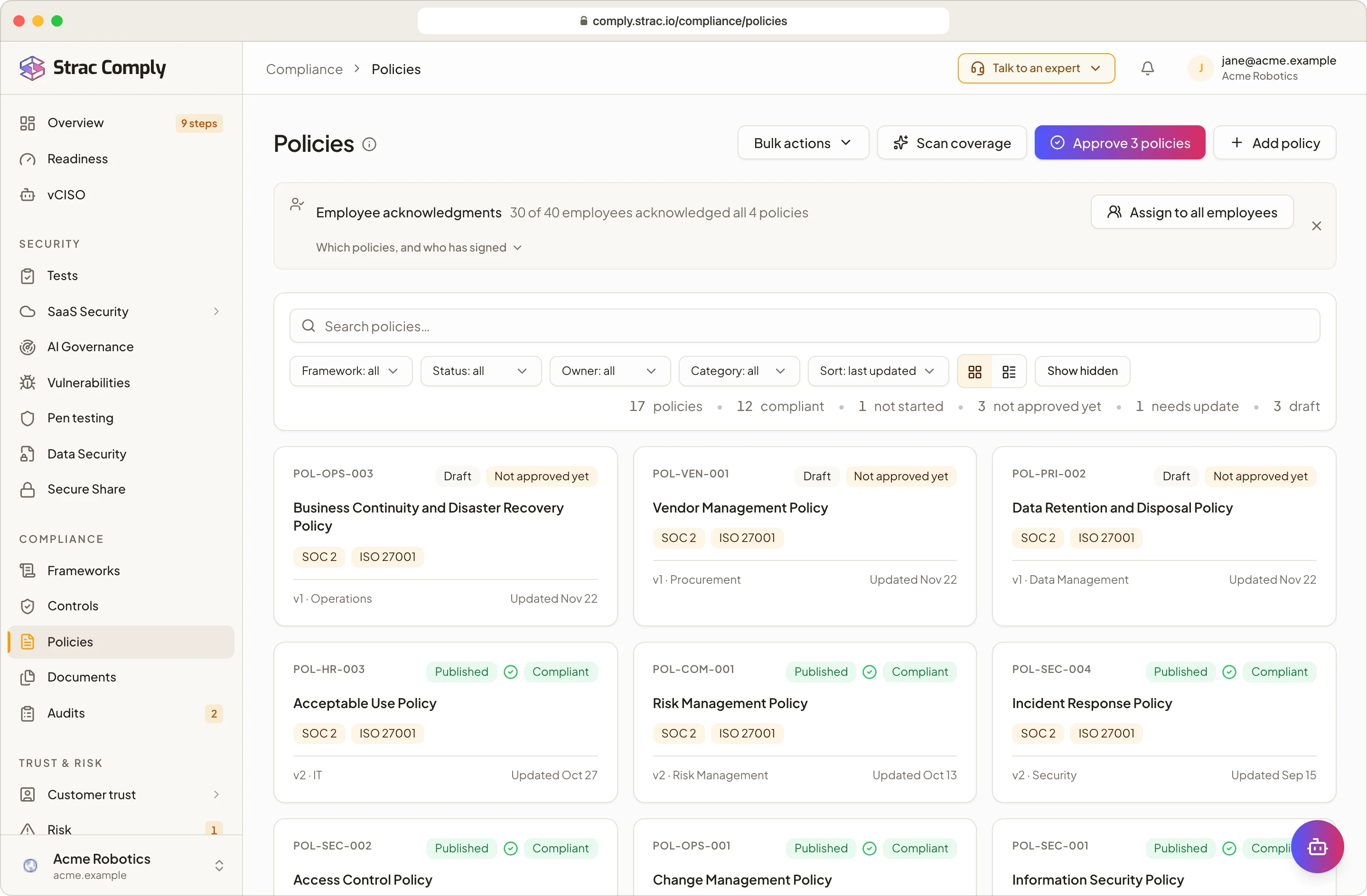
Step 1: Generate your drafts
Open Policies under Compliance. Click Generate missing policies. Each draft uses your company answers.
Admin
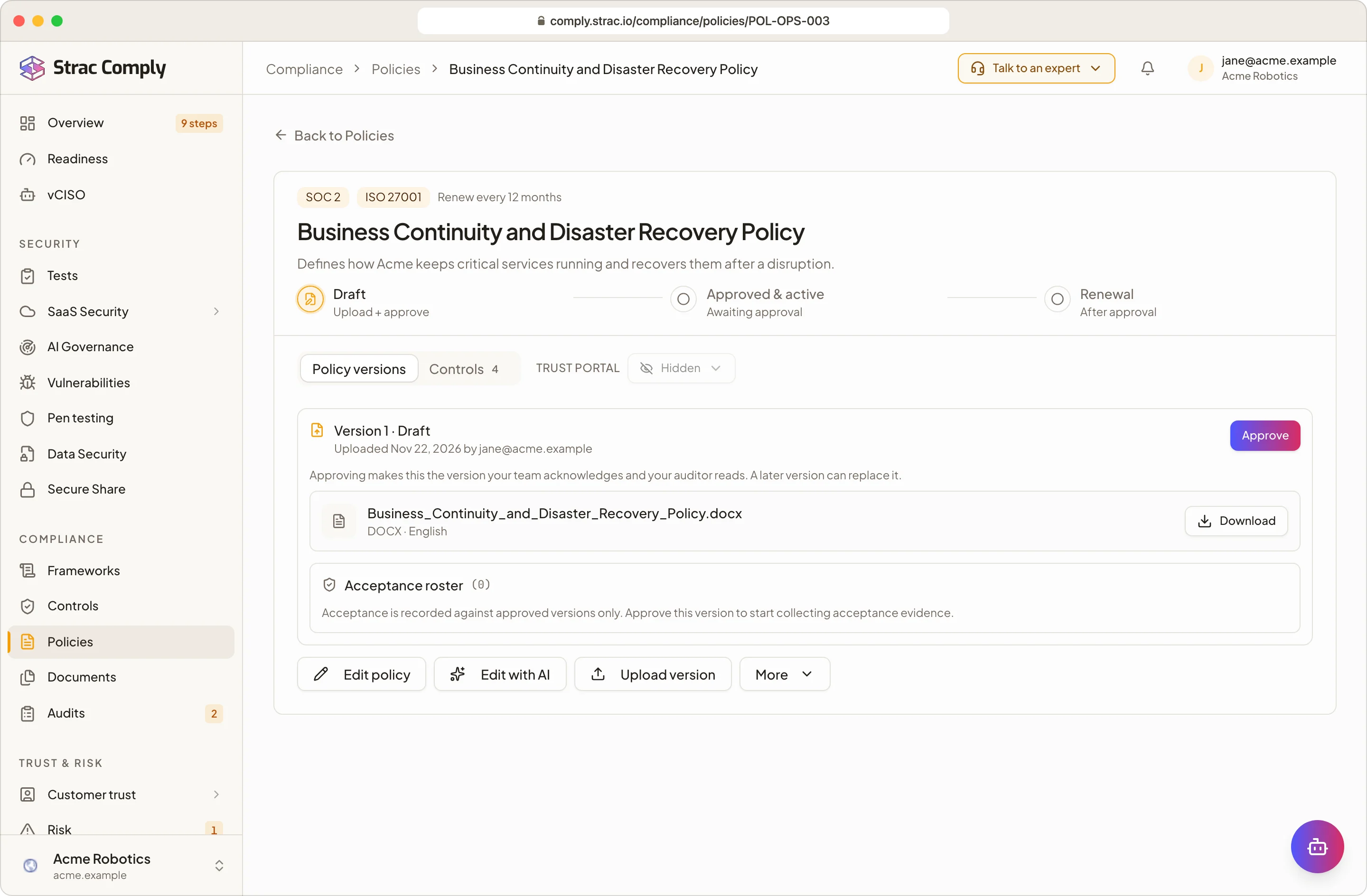
Step 2: Review and approve
Open a draft and read it. Edit it or upload your own version if you need to. Then click Approve.
Admin
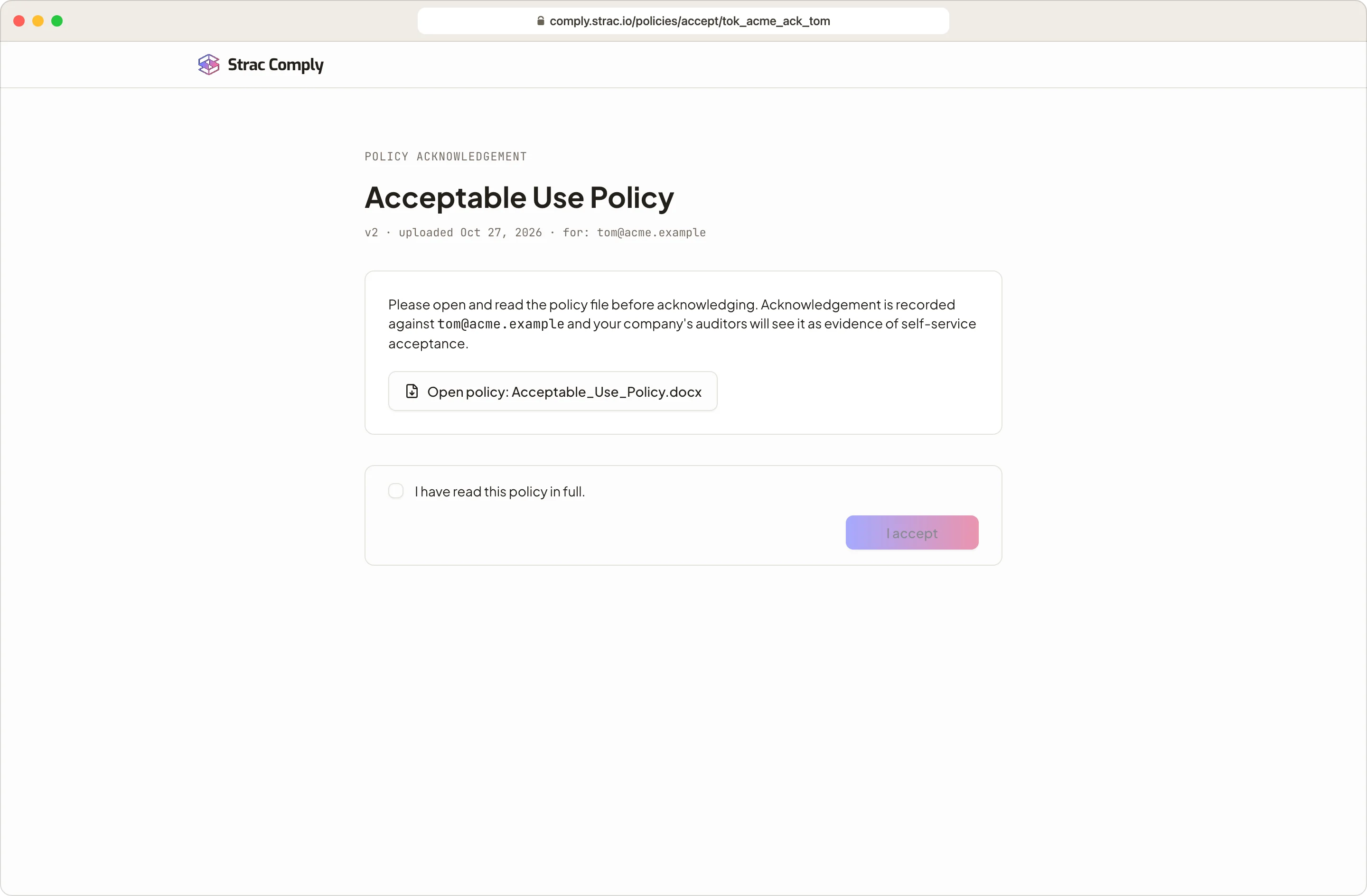
Step 3: Send to your team
Click Assign to all employees. Each person gets an email link to read the policy and click I accept.
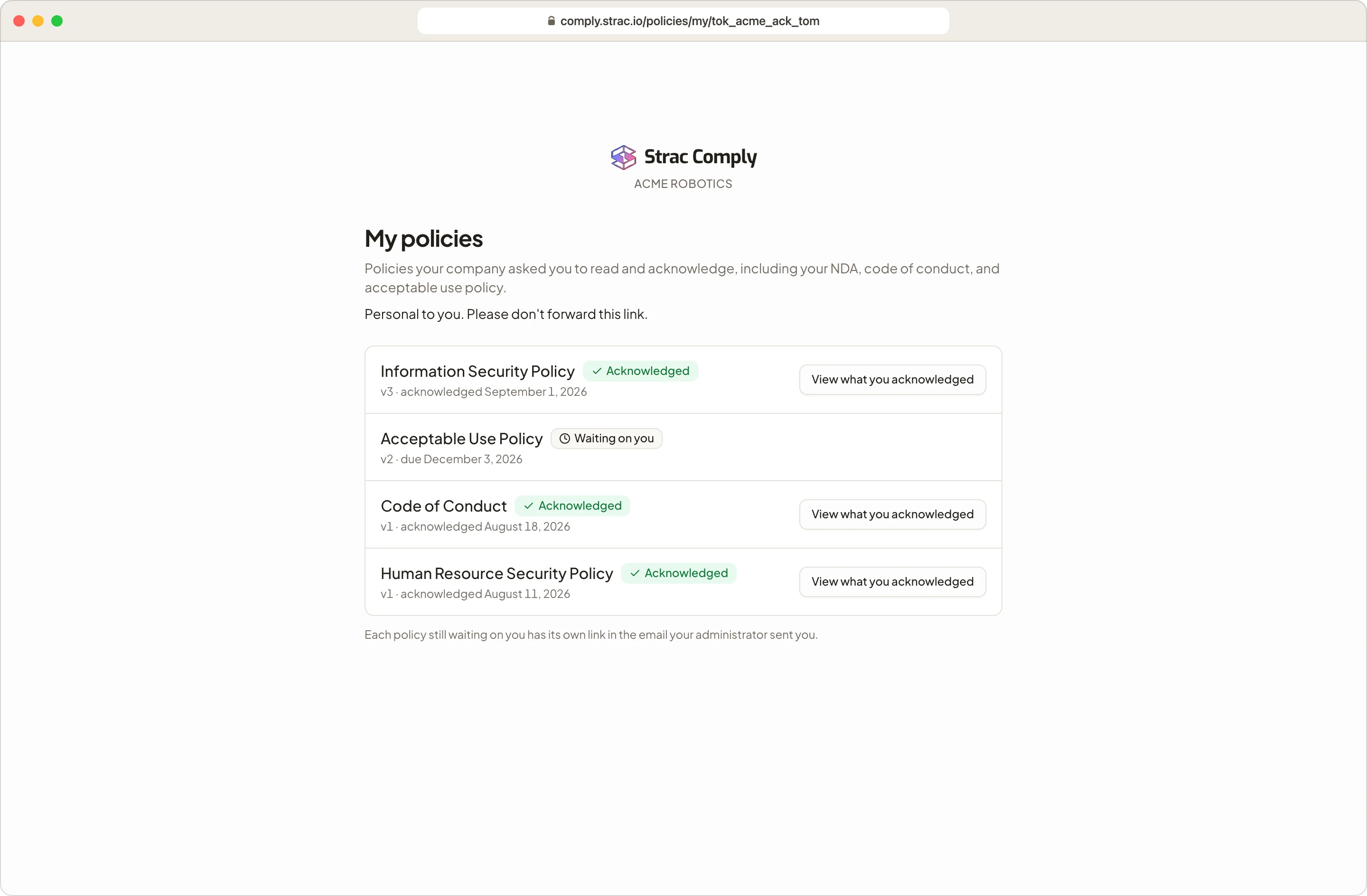
Strac Comply sends to the people on your roster, so connect your identity provider or HR system first. Each employee also has a My policies page. It shows what they accepted and what still waits on them.
Review each policy once a year.
Which policies does Strac Comply draft?
The catalog holds 40 policies. You get the ones your frameworks need. Policies marked Staff accept must be accepted by every employee.
| Policy | SOC 2 | ISO 27001 | PCI DSS | HIPAA | HIPAA Privacy | NIST CSF | CCPA | Staff accept |
|---|---|---|---|---|---|---|---|---|
| Acceptable Use Policy | ✓ | ✓ | ✓ | ✓ | ✓ | Yes | ||
| Access Control Policy | ✓ | ✓ | ✓ | ✓ | ✓ | ✓ | ||
| Asset Management Policy | ✓ | ✓ | ✓ | ✓ | ✓ | |||
| Authentication and Password Policy | ✓ | |||||||
| Backup and Recovery Policy | ✓ | ✓ | ✓ | ✓ | ✓ | |||
| Business Continuity and Disaster Recovery Policy | ✓ | ✓ | ✓ | ✓ | ✓ | |||
| Change Management Policy | ✓ | ✓ | ✓ | ✓ | ✓ | ✓ | ||
| Code of Conduct | ✓ | Yes | ||||||
| Compliance Management Policy | ✓ | ✓ | ✓ | ✓ | ✓ | ✓ | ||
| Confidentiality / Non-Disclosure Agreement | ✓ | ✓ | Yes | |||||
| Consumer Privacy Rights Policy | ✓ | |||||||
| Cybersecurity Improvement Policy | ✓ | |||||||
| Cybersecurity RACI & Authorities | ✓ | ✓ | ||||||
| Data Classification and Handling Policy | ✓ | ✓ | ✓ | ✓ | ✓ | ✓ | ||
| Data Retention and Disposal Policy | ✓ | ✓ | ✓ | ✓ | ✓ | |||
| Encryption Policy | ✓ | ✓ | ✓ | ✓ | ✓ | ✓ | ||
| Human Resource Security Policy | ✓ | ✓ | ✓ | ✓ | ✓ | ✓ | Yes | |
| Incident Response Policy | ✓ | ✓ | ✓ | ✓ | ✓ | ✓ | ||
| Individual Rights and Notice of Privacy Practices Policy | ✓ | |||||||
| Information Security Policy | ✓ | ✓ | ✓ | ✓ | ✓ | ✓ | Yes | |
| Mission & Business Context Policy | ✓ | |||||||
| Network Security Policy | ✓ | ✓ | ✓ | ✓ | ✓ | ✓ | ||
| Payment Information Security Policy | ✓ | |||||||
| Physical Security Policy | ✓ | ✓ | ✓ | ✓ | ✓ | ✓ | ||
| Privacy Policy | ✓ | ✓ | ✓ | ✓ | ✓ | |||
| Privacy Program Administration Policy | ✓ | |||||||
| Privacy Risk Assessment and Automated Decisionmaking Policy | ✓ | |||||||
| Processing Integrity Policy | ✓ | ✓ | ✓ | ✓ | ||||
| Risk Management Policy | ✓ | ✓ | ✓ | ✓ | ✓ | ✓ | ||
| Risk Management Strategy & Risk Appetite | ✓ | |||||||
| Sale, Sharing and Sensitive Personal Information Policy | ✓ | |||||||
| Secure Configuration and System Hardening Policy | ✓ | ✓ | ||||||
| Secure Development Lifecycle Policy | ✓ | ✓ | ✓ | ✓ | ✓ | ✓ | ||
| Security Awareness and Training Policy | ✓ | ✓ | ✓ | ✓ | ✓ | ✓ | ||
| Supply Chain Risk Management | ✓ | |||||||
| System Monitoring and Logging Policy | ✓ | ✓ | ✓ | ✓ | ✓ | ✓ | ||
| Third-Party Risk Management Policy | ✓ | ✓ | ✓ | ✓ | ✓ | ✓ | ||
| Uses and Disclosures of Protected Health Information Policy | ✓ | |||||||
| Vendor Management Policy | ✓ | ✓ | ✓ | ✓ | ✓ | ✓ | ||
| Vulnerability Management Policy | ✓ | ✓ | ✓ | ✓ | ✓ | ✓ |
You can also add your own policy. It sits beside the catalog policies and counts toward the controls you link it to.
Which controls do the policies cover?
Each policy maps to the controls it satisfies. Open a policy to see its exact controls. Each control page also lists the policies that cover it.
| Framework | Policies | Controls the policies map to |
|---|---|---|
| SOC 2 | 26 | 61 |
| ISO 27001:2022 | 25 | 120 |
| PCI DSS v4.0.1 | 20 | 250 |
| HIPAA Security Rule | 24 | 100 |
| HIPAA Privacy Rule | 3 | 108 |
| NIST CSF 2.0 | 29 | 106 |
| CCPA | 28 | 71 |
A policy counts toward its controls once it is approved and inside its review year.
Frequently asked questions
Do I have to use the drafted text?
No. Edit a draft, or upload your own version of any policy. You can also add a policy that is not in the catalog.
Who can approve a policy?
Owners and admins. A draft that still has a section waiting for your answer cannot be approved until you answer it.
Do employees need a Strac Comply account to accept a policy?
No. Each person gets an email link. The link opens the policy, and one click records their acceptance.
How long does an approved policy count?
For 12 months. Then review it. If nothing changed, Mark reviewed starts a new year without new acceptances.
Does one policy cover several frameworks?
Yes. A policy such as Access Control maps to controls in every framework it serves, so you approve it once.
Can my AI agent approve policies?
Yes, when you connect it with the policies approve scope and your role is owner or admin. Ask it which drafts are ready first.
Next steps
- Integrations and automated testsConnect your tools and see the tests that run on them every day.
- SaaS security and access reviewsSee every account and run your access reviews.
- All guidesSet up the rest of Strac Comply, one feature at a time.
New to Strac Comply? Start free trial.