Agreements and NDA e-signature
Upload your NDA once and send a signing link. The signer reviews the PDF, signs in the browser, and you both get a signed copy with a record of when it was signed.
- Signers per link
- One, at the email you choose
- Template
- A PDF of up to 50 MB
- Counts toward
- SOC 2 and ISO 27001, once you upload and publish the signed copy
Last checked November 27, 2026
Can I send agreements from my AI agent?
No. You send signing links in the dashboard, and no MCP tool reads or sends them. Your agent can file a signed copy as evidence and check your NDA documents.
| MCP tool | Access | What you use it for |
|---|---|---|
| list_documents | Read | Whether your NDA documents are filed, and when each is due for review. |
| begin_document_upload | Write | Starts the upload of a signed NDA to its document. |
| finalize_document_upload | Write | Finishes the upload and saves it as a draft version. |
| publish_document | Write | Publishes that draft, so it counts as evidence. File an employee NDA in Documents or on their People record instead, so it is filed for that person. |
Try these prompts
- Is our signed NDA document filed and current?
- Upload this signed NDA to our third party NDA document and publish it.
- Which NDA documents does our audit still need?
What your agent gets back. Each document with its status, its current version and its next review date. An upload returns the version to publish.
First time? Connect your agent once, then ask.
How do I send an NDA for signature?
Open Organization > Agreements. Owners and admins can use it.
Admin
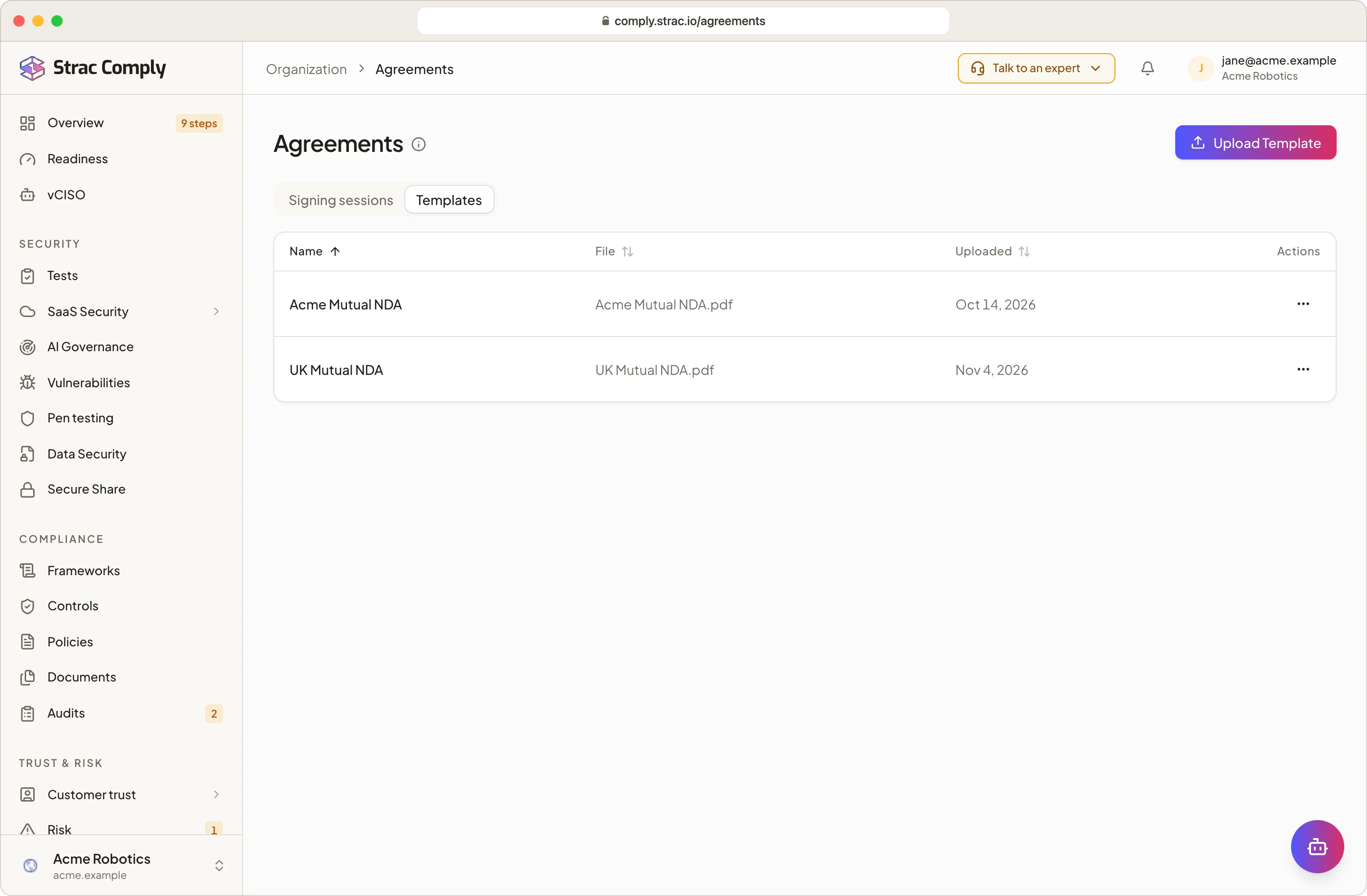
Step 1: Upload your template
On Templates, click Upload Template and pick your NDA as a PDF.
Admin
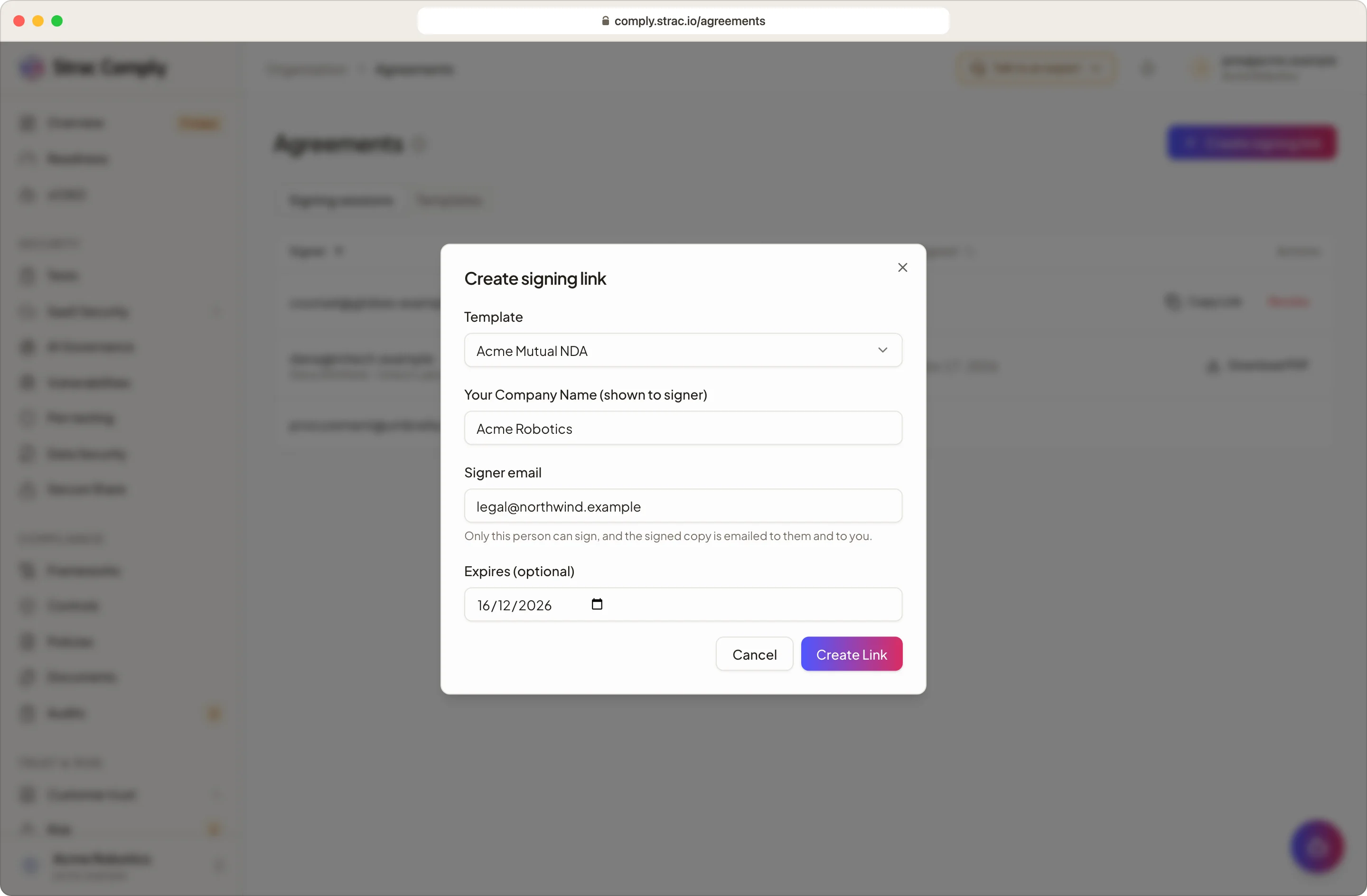
Step 2: Create a signing link
On Signing sessions, click Create signing link. Pick the template, type your company name and the signer email.
Admin
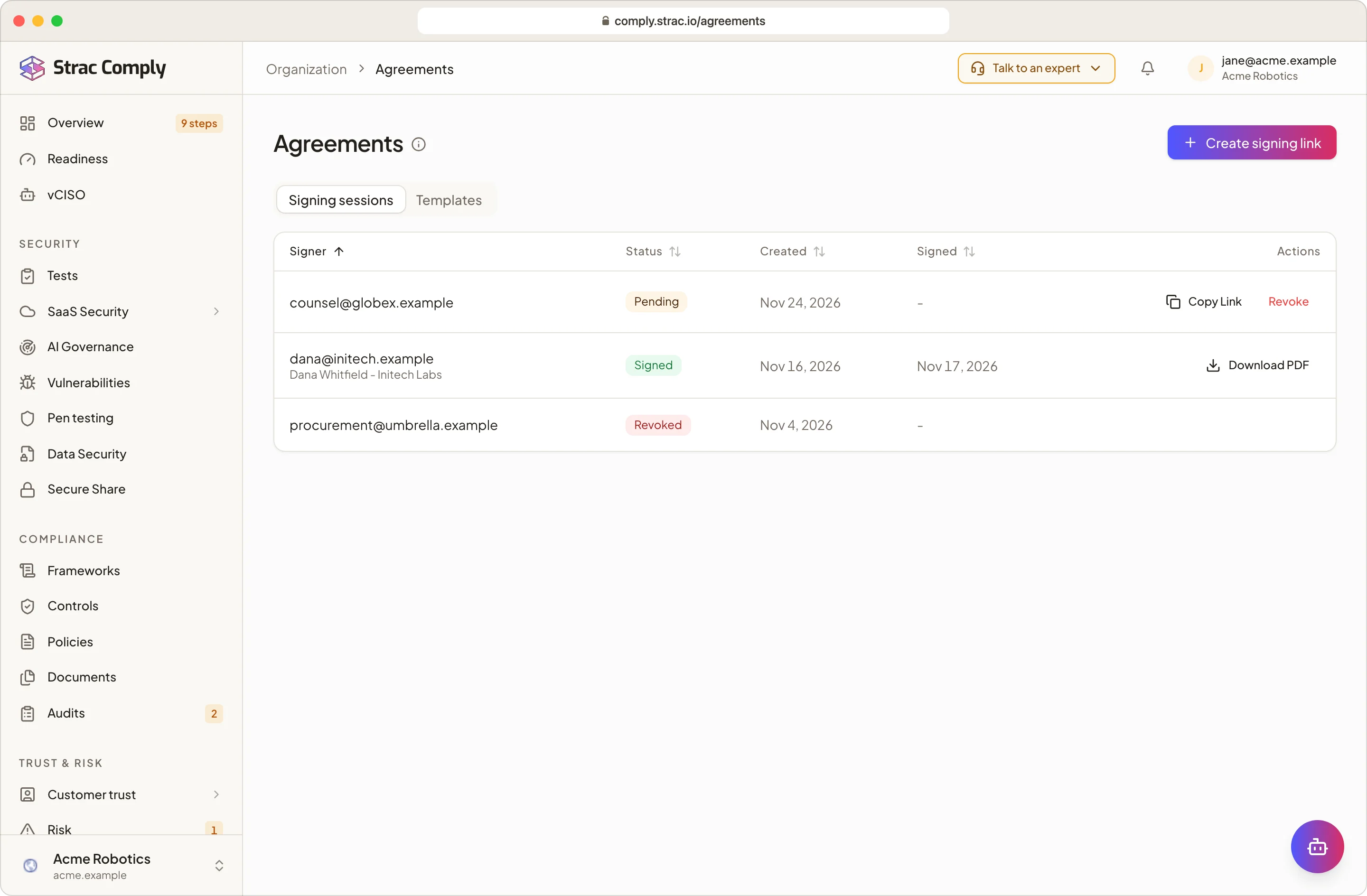
Step 3: Download the signed copy
When the row shows Signed, click Download PDF. Strac Comply also emails the signed copy to the signer address on the link, copying its creator. A PDF too large to attach is left out. The email then tells the signer to ask you for a copy.
Copy the link and send it to the signer yourself. They review the PDF, fill in their details and draw their signature.
The company name field starts as Strac. Replace it with your own, because the signer sees it at the top of the page.
An expiry date is optional. The link stops working at 00:00 UTC on the day you pick, which is the evening before in the Americas. For an exact cutoff, revoke the link yourself.
Changed your mind? Click Revoke on a pending link, and it stops working. A signed link cannot be signed again.
What is in the signed PDF?
| Part | What it holds |
|---|---|
| Your template | Every page of the PDF you uploaded |
| Signature page | The signer's name, title, email, company, company address, drawn signature and the date |
| Electronic record page | The signer's IP address and browser, recorded when they signed |
| Status | What it means |
|---|---|
| Pending | Created and not signed yet. You can copy the link again or revoke it. |
| Signed | Signed with the signer email. Download PDF gets the signed copy. |
| Revoked | You stopped the link before it was signed. |
| Expired | Someone opened or submitted the link after its expiry date. |
The form accepts only the signer email, but anyone who has the link can sign with it. Send the link to the signer alone.
Which controls can a signed NDA cover?
Agreements files nothing on its own. Download the signed PDF and upload it on Compliance > Documents. An NDA with a customer, vendor or partner goes to NDAs / Confidentiality Agreements with Third Parties. One an employee or contractor signed goes to Signed Confidentiality Agreement (NDA), filed for that person. Already filed one? Click Add another document for each new signer, so the earlier NDA stays current.
Once published, those documents count toward these controls. The personnel NDA document can need an NDA for everyone in scope, and it shows how many people have one.
| Framework | Controls |
|---|---|
| SOC 2 |
|
| ISO 27001:2022 |
|
Codes use each framework's own numbering: SOC 2 Trust Services Criteria, ISO/IEC 27001:2022 Annex A, PCI DSS v4.0.1 and NIST CSF 2.0. HIPAA codes cite sections of 45 CFR Part 164. CCPA codes cite the CCPA statute and its regulations.
Business associate agreements.
Frequently asked questions
Does Strac Comply email the signing link?
No. You copy the link and send it yourself. After signing, Strac Comply emails the signed PDF to the signer address set on the link, and copies whoever created the link. An older link with no signer address sends it to its creator only. If the signed PDF is too large to attach, the email goes out without it and says so. The signer is asked to get a copy from you. If it does not arrive, use Download PDF.
Can more than one person sign?
No. Each link has one signer, at the email you choose. Create one link for each signer.
Can I use it for agreements other than an NDA?
It is built for NDAs. The signing page reads Mutual Non-Disclosure Agreement, whatever PDF you upload.
Does Strac Comply remind the signer?
No. Check Signing sessions for links still Pending, and follow up with the signer yourself.
Can my trust portal use the same NDA?
Yes, if the template PDF is 10 MB or smaller. In the trust portal settings, turn on Accept access requests and choose Use an agreement from Agreements. Pick the template, then turn on Require this agreement before a request. For a larger PDF, upload a smaller copy or choose Paste the text instead.
Does a signed NDA count as evidence on its own?
No. Upload the signed PDF to the NDA document that matches the signer and publish it. Then it counts as evidence.
Questions that apply to every guide, such as who needs an account, are in the guides FAQ.
Next steps
- Trust portalAsk buyers to accept your NDA before they see restricted documents.
- Vendor risk managementKeep each vendor's reports and contracts on its Documents tab.
- Documents and registersUpload and publish the documents your audit asks for.
New to Strac Comply? Start free trial.