Vulnerability scanning and AI Pen Test
Scan the web apps on your own domains, then track each finding until a retest confirms the fix. The Vulnerabilities page lists what your connected scanners find.
Security-FirstWeb app scans are part of every paid plan. The AI Pen Test with retest is part of Security-First. See plans.
- Scans
- Web apps on domains you prove you own
- Reports
- A shareable summary, a letter of attestation and a technical report
- Scanner findings from
- AWS Inspector, Dependabot, CrowdStrike and more
Last checked November 25, 2026
How do I check vulnerabilities from my AI agent?
Your agent reads the findings your connected scanners saved. It can also check who gets the deadline reminders.
| MCP tool | Access | What you use it for |
|---|---|---|
| list_vulnerabilities | Read | Your scanner findings, with severity, whether each is past its fix deadline and whether a check matched it to CISA's known exploited list. Up to 200 per answer by default. |
| get_vulnerability_reminder_settings | Read | Who is set to get the deadline reminders, for which severities, and how often. |
| set_vulnerability_reminder_settings | Write | Turn reminders on or send them to more people. It never turns them off or narrows them. |
| list_documents | Read | Your documents and their status, including the pen test report and the scan results when your frameworks use them. |
Try these prompts
- Which critical vulnerabilities are past their fix deadline?
- Show the findings that are known to be exploited.
- Who gets our vulnerability deadline reminders?
- Include high findings in our vulnerability reminders.
What your agent gets back. Each finding with its source, severity and whether the last scan found it overdue, plus counts for what was not listed. Check which scanners the answer names before you treat an empty list as clean.
Run the pen test in the dashboard.
First time? Connect your agent once, then ask.
How do I run a pen test?
Open Pen testing in the sidebar. Owners and admins add targets, start scans and request retests.
Admin
Step 1: Add your target
If you see Activate pen testing, click it first. Choose Add your first target. Enter your domain and who authorizes the test, then click Add target. Add the DNS TXT record the page shows and click Check DNS.
Admin
Step 2: Start the scan
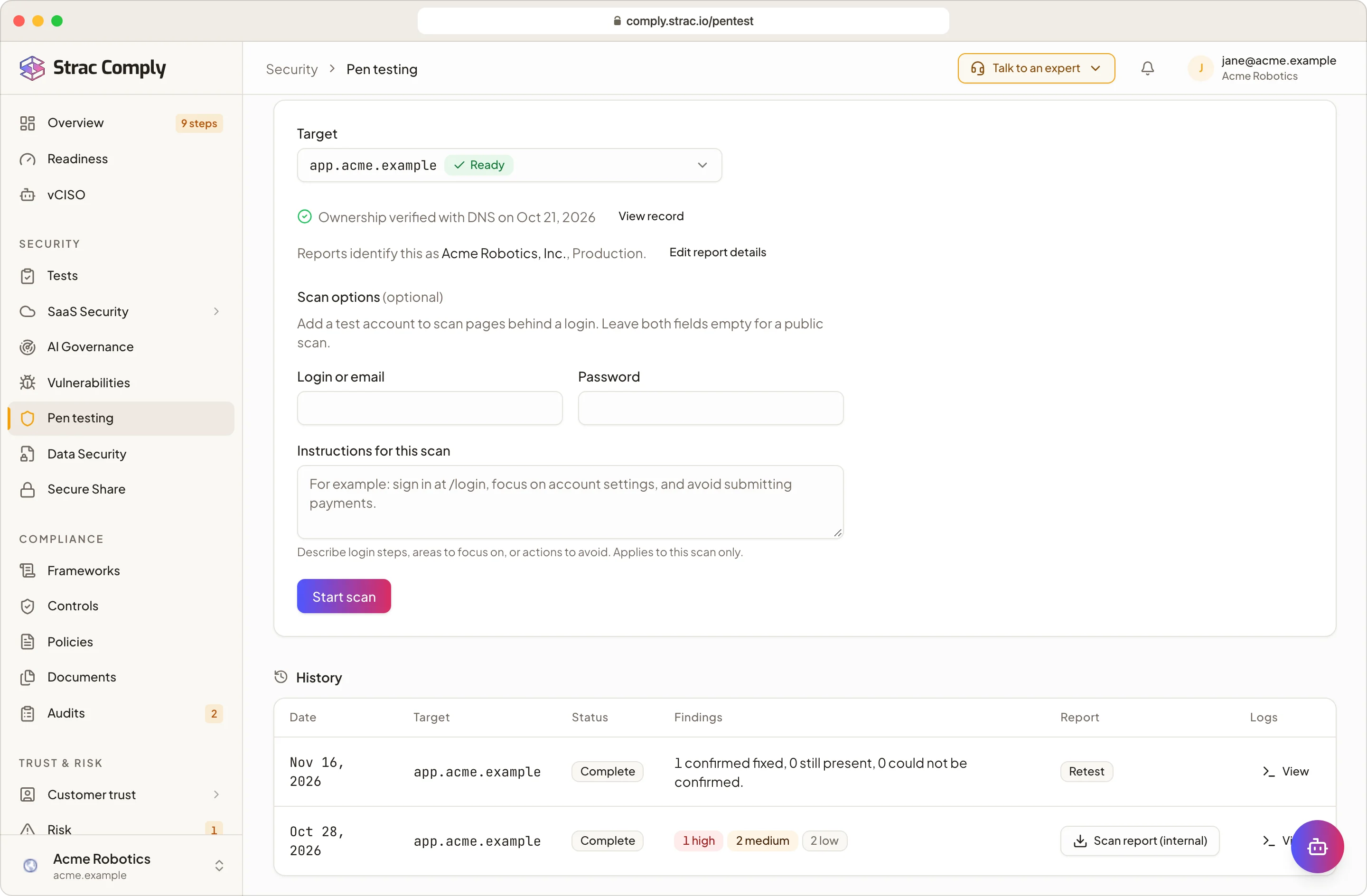
Pick a target that shows Ready. To scan pages behind a login, enter a test account under Scan options first. Then click Start scan.
Admin
Step 3: Fix and retest
Open a finding under Findings. Fix it and click Mark fixed. When Request retest appears, click it, check the domains, then click Start retest.
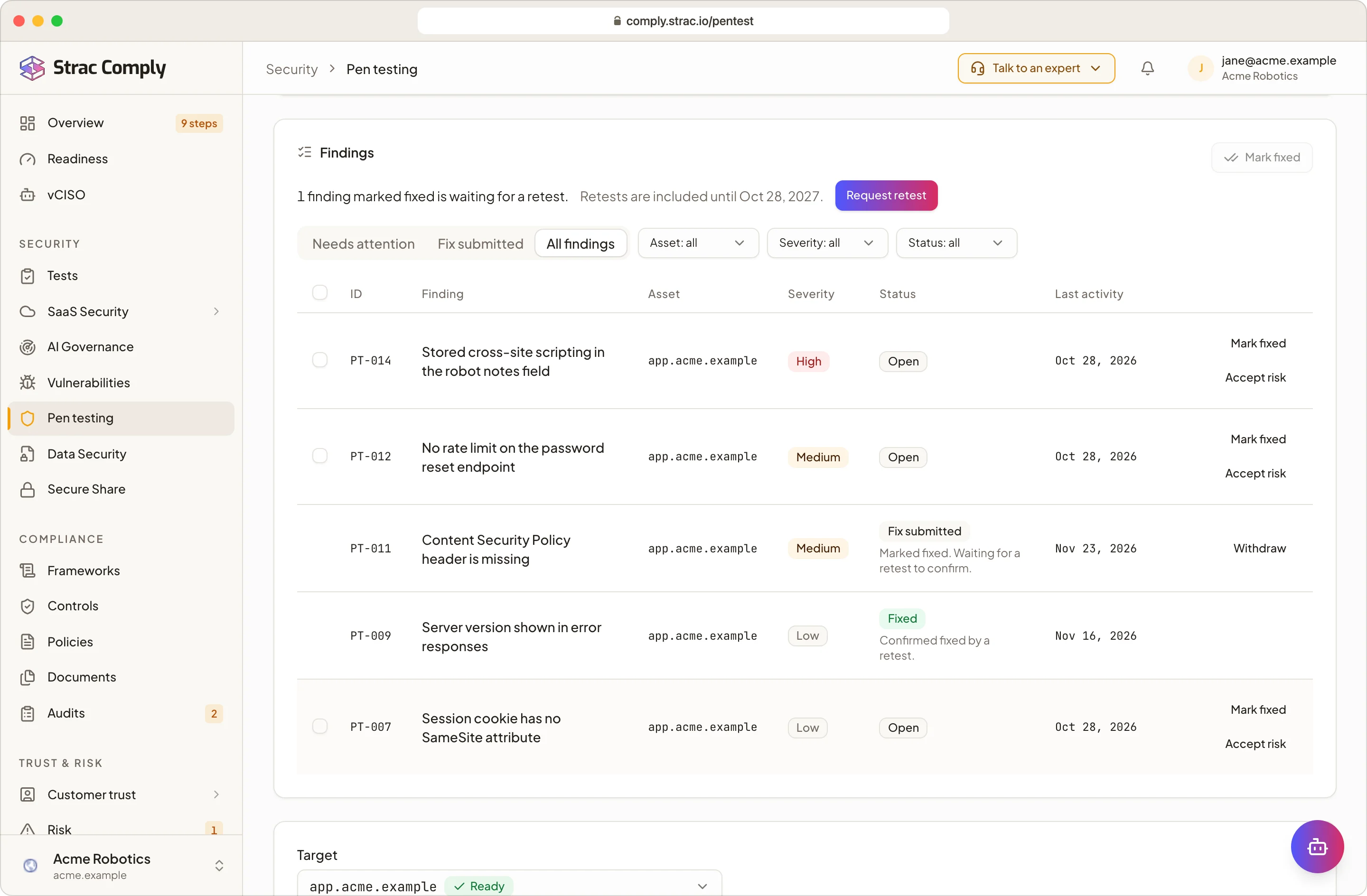
A finding shows Fixed only when a retest confirms the fix. When your included retests end on a date, the page shows it.
Download the shareable summary and the letter of attestation from the Reports card. Owners and admins also download the technical report there. A completed scan files a redacted copy of its report as a draft on Penetration Test Report, unless you marked that document not applicable. Review and publish it in Documents.
How do I see what my scanners found?
Open Vulnerabilities to see findings past their fix deadline, plus findings with no deadline, such as exposed secrets. Findings still inside their deadline are counted, not listed. Choose Past SLA to see what the last scan found overdue. Findings a check matched to CISA's Known Exploited Vulnerabilities list are flagged, so you can fix them first.
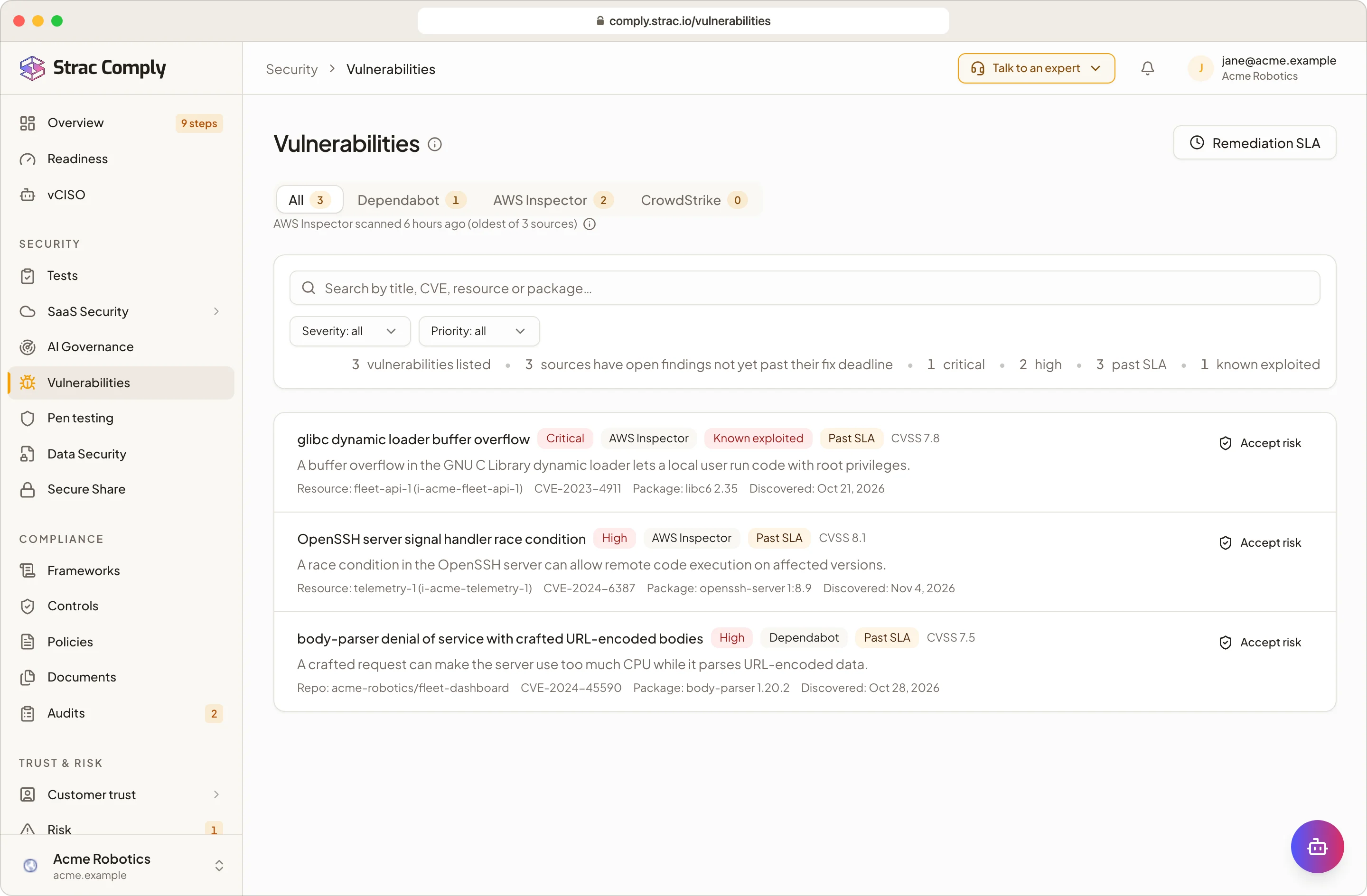
- Owners and admins click Remediation SLA to set how many days each severity has before a finding is Past SLA. With PCI DSS in scope, checks hold critical and high to 30 days or less.
- Click Accept risk on a finding to record your decision with a reason. Owners and admins can do this.
- Deadline reminders are on by default. Owners and admins change them in Settings under Vulnerability deadline reminders. Each recipient sees them in the app and gets an email, unless that person turned reminder emails off. Pick a Slack channel to send a company-wide summary there too.
What does it cover?
| Part | What you get | Where |
|---|---|---|
| Web app scan | A scan of the web apps on domains you proved you own with DNS | Pen testing |
| Findings register | Each finding with its severity, status and retest result | Pen testing |
| Reports | A shareable summary, a one page letter of attestation and a technical report for your engineers | Pen testing |
| Scanner findings | AWS Inspector, AWS Security Hub, AWS Patch (SSM), CrowdStrike, Dependabot, GitHub code and secret scanning, Jamf, Supabase and GitLab | Vulnerabilities |
| Deadline reminders | Email and Slack reminders for AWS Inspector, CrowdStrike and Dependabot findings before their deadline | Settings |
Scans start after your first payment. During the free trial, owners and admins can name the domain to test in onboarding. The Vulnerabilities page works in the trial.
Which controls does it count toward?
Two documents carry the results. Once published, each one is evidence for the controls below.
Penetration Test Report
A completed scan files a redacted copy of its report here as a draft. For PCI DSS it is supporting evidence only.
| Framework | Controls |
|---|---|
| SOC 2 |
|
| ISO 27001:2022 |
|
| PCI DSS v4.0.1 |
|
| NIST CSF 2.0 |
|
| HIPAA Security Rule |
|
| CCPA |
|
Codes use each framework's own numbering: SOC 2 Trust Services Criteria, ISO/IEC 27001:2022 Annex A, PCI DSS v4.0.1 and NIST CSF 2.0. HIPAA codes cite sections of 45 CFR Part 164. CCPA codes cite the CCPA statute and its regulations.
The scan results report
Strac Comply writes this report from your connected scanners. It is not an ASV scan.
| Framework | Controls |
|---|---|
| SOC 2 |
|
| ISO 27001:2022 |
|
| PCI DSS v4.0.1 |
|
| NIST CSF 2.0 |
|
| HIPAA Security Rule |
|
| CCPA |
|
Codes use each framework's own numbering: SOC 2 Trust Services Criteria, ISO/IEC 27001:2022 Annex A, PCI DSS v4.0.1 and NIST CSF 2.0. HIPAA codes cite sections of 45 CFR Part 164. CCPA codes cite the CCPA statute and its regulations.
What about PCI DSS 11.4?
PCI DSS 11.4.2 and 11.4.3 need a report from a qualified, independent tester. Upload that report to your PCI documents.
Frequently asked questions
Does it run in the free trial?
Scans start after your first payment. Owners and admins can name the domain to test in onboarding. The Vulnerabilities page and its tests work in the trial.
Do I have to prove I own the domain?
Yes, once per domain. Add the TXT record _strac-verify.<domain> that the page shows. Its subdomains use the same proof.
How do I know a finding is fixed?
Click Mark fixed. When Request retest appears, click it and then Start retest. The finding shows Fixed only after a retest confirms it.
Which report do I need for PCI DSS 11.4?
PCI DSS 11.4.2 and 11.4.3 need a report from a qualified, independent tester. Upload it to your PCI documents.
Why does the Vulnerabilities page not list every finding?
It lists findings past their fix deadline and counts the ones still inside it. Most checks keep up to 150 findings, and each scanner tells you when it found more. When an AWS Inspector check offers a CSV, download it for more than the list shows.
Questions that apply to every guide, such as who needs an account, are in the guides FAQ.
Next steps
- Integrations and automated testsConnect AWS, GitHub or CrowdStrike, so their findings show on the Vulnerabilities page.
- Vulnerability managementFix deadlines, reminders and accepted risks for your scanner findings.
- AuditsSee how your auditor reviews the pen test report you publish.
- PCI DSSThe PCI DSS requirements and the evidence Strac Comply collects for them.
- AI GovernanceReview the AI tools and apps your team connected to company accounts.
New to Strac Comply? Start free trial.