Asset inventory
See the servers, databases, repositories, devices and SaaS apps your connected tools report in one list. Exclude what is out of scope with a reason, and keep the inventory as evidence for your audit.
- Collects from
- AWS, Google Cloud Platform, Microsoft Azure, GitHub, Jamf Pro and more
- Categories
- 8, from compute to devices
- Counts toward
- SOC 2, ISO 27001, PCI DSS, NIST CSF and CCPA
Last checked November 25, 2026
How do I read my asset inventory from my AI agent?
Ask your agent what you run and who owns it. It reads the latest snapshot you see on the Inventory page.
| MCP tool | Access | What you use it for |
|---|---|---|
| list_inventory | Read | Assets in the latest snapshot, 100 per call by default and 500 at most, by category, with type, source, owner and scope status. |
| list_scope_exclusions | Read | Assets your checks exclude from scope, with the reason, who excluded it and when. Up to 200 per call by default. |
| exclude_from_scope | Write | Takes an asset out of scope for the checks that support exclusions, with a reason your auditor can read. |
| restore_to_scope | Write | Puts an excluded asset back, so its checks count it again. |
Try these prompts
- How many assets do we have in each category?
- List our data stores and who owns each one.
- Which assets are excluded from scope, and why?
- Exclude the staging bucket from scope. It holds test data only.
- Put the old build server back in scope.
What your agent gets back. Exact counts first: assets in scope, excluded, added by hand and per category. Then one row per in-scope asset, adding excluded ones if you ask. The snapshot date shows how current it is, and the answer says when the list was cut short. The Inventory page shows collection warnings for each source.
First time? Connect your agent once, then ask.
How do I build my asset inventory in the dashboard?
Connect your cloud, code and device tools first. Strac Comply collects a snapshot of their assets, and you add the rest by hand.
Admin
Step 1: See every asset
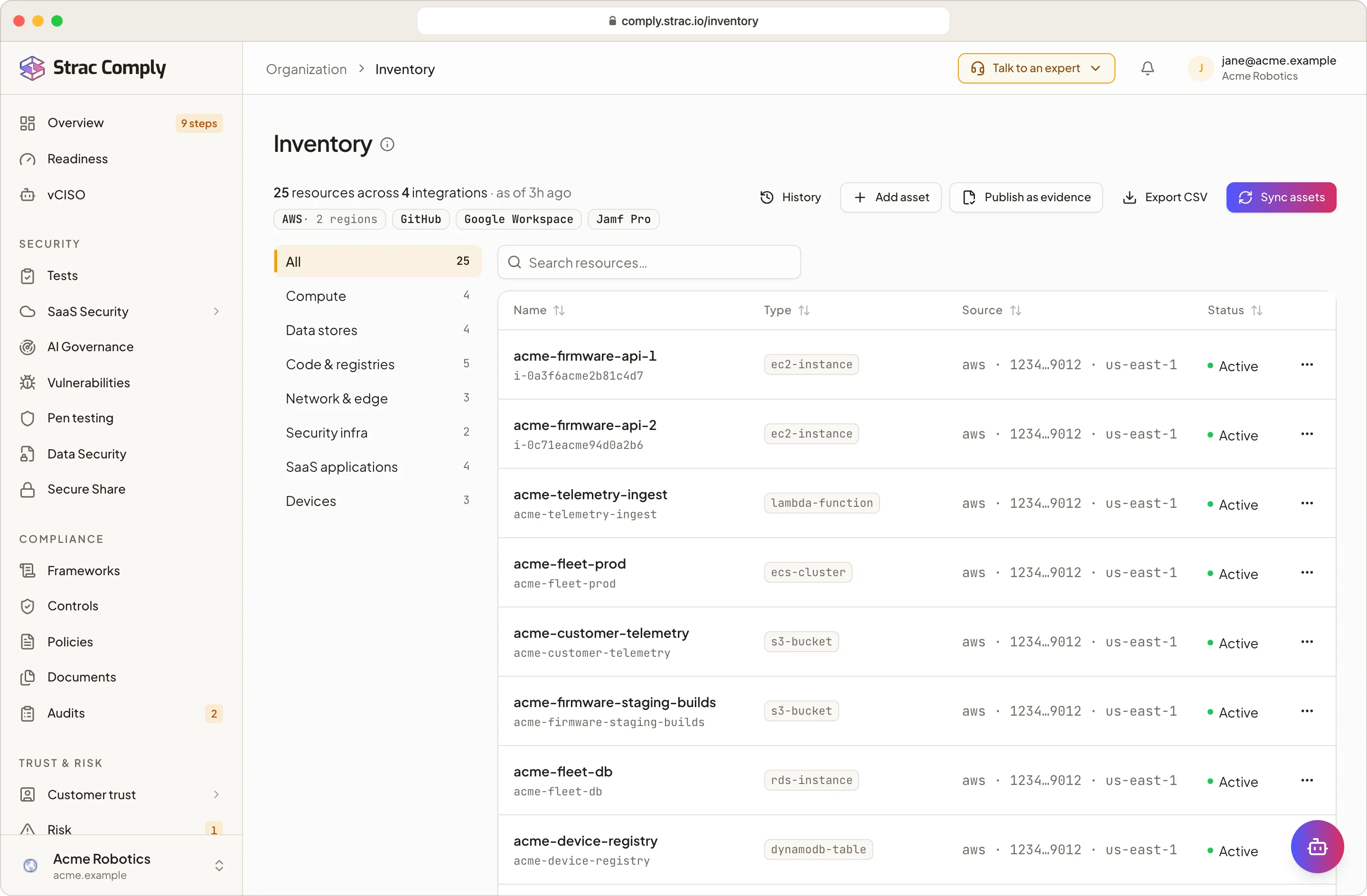
Open Organization > Inventory. Pick a category or search by name. Click Sync assets to collect a new snapshot.
Admin
Step 2: Exclude what is out of scope
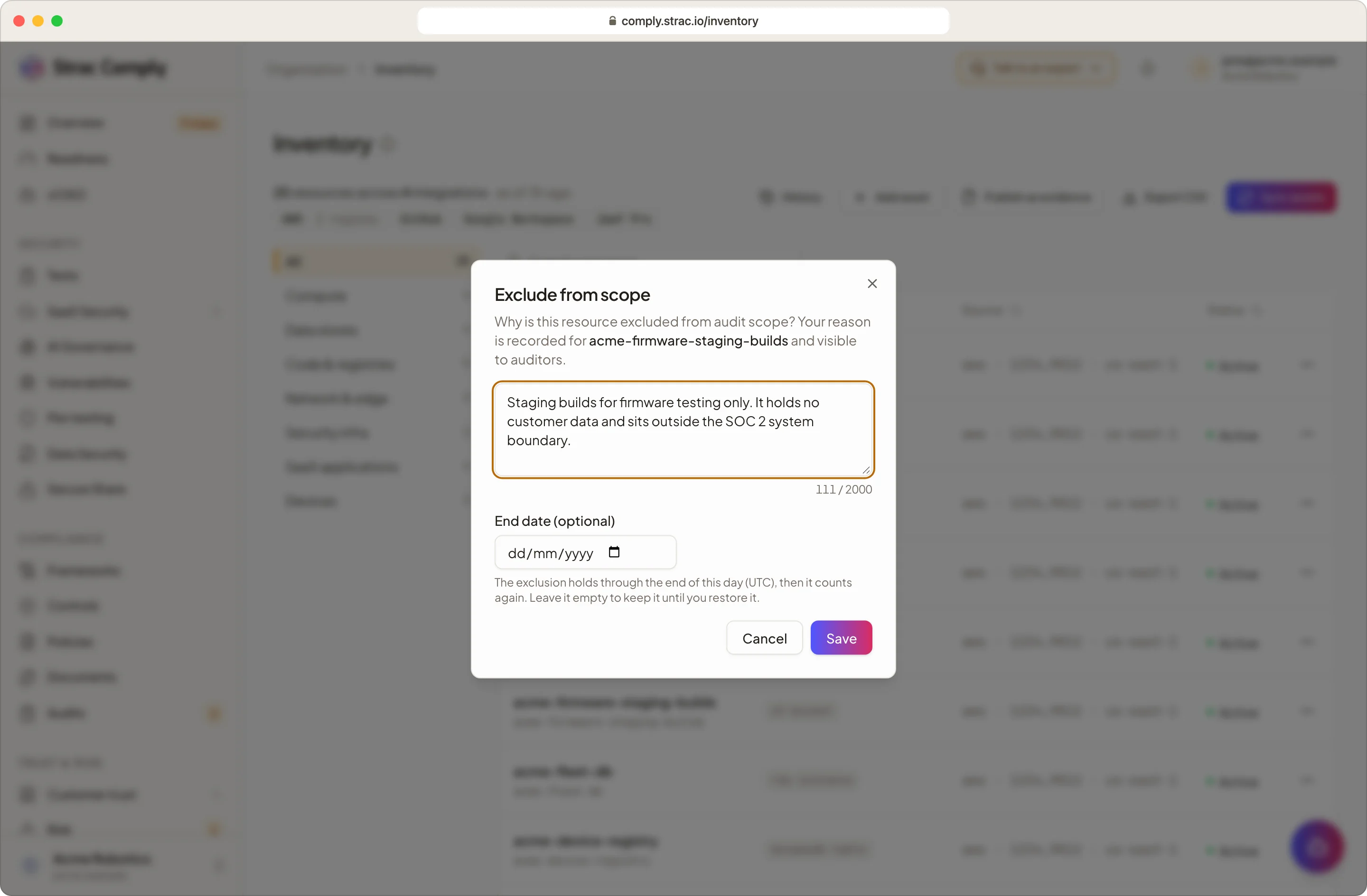
Open the menu on a row and click Exclude from scope. Write why. Your auditor sees the reason in the inventory shared for their audit.
Admin
Step 3: Keep the record
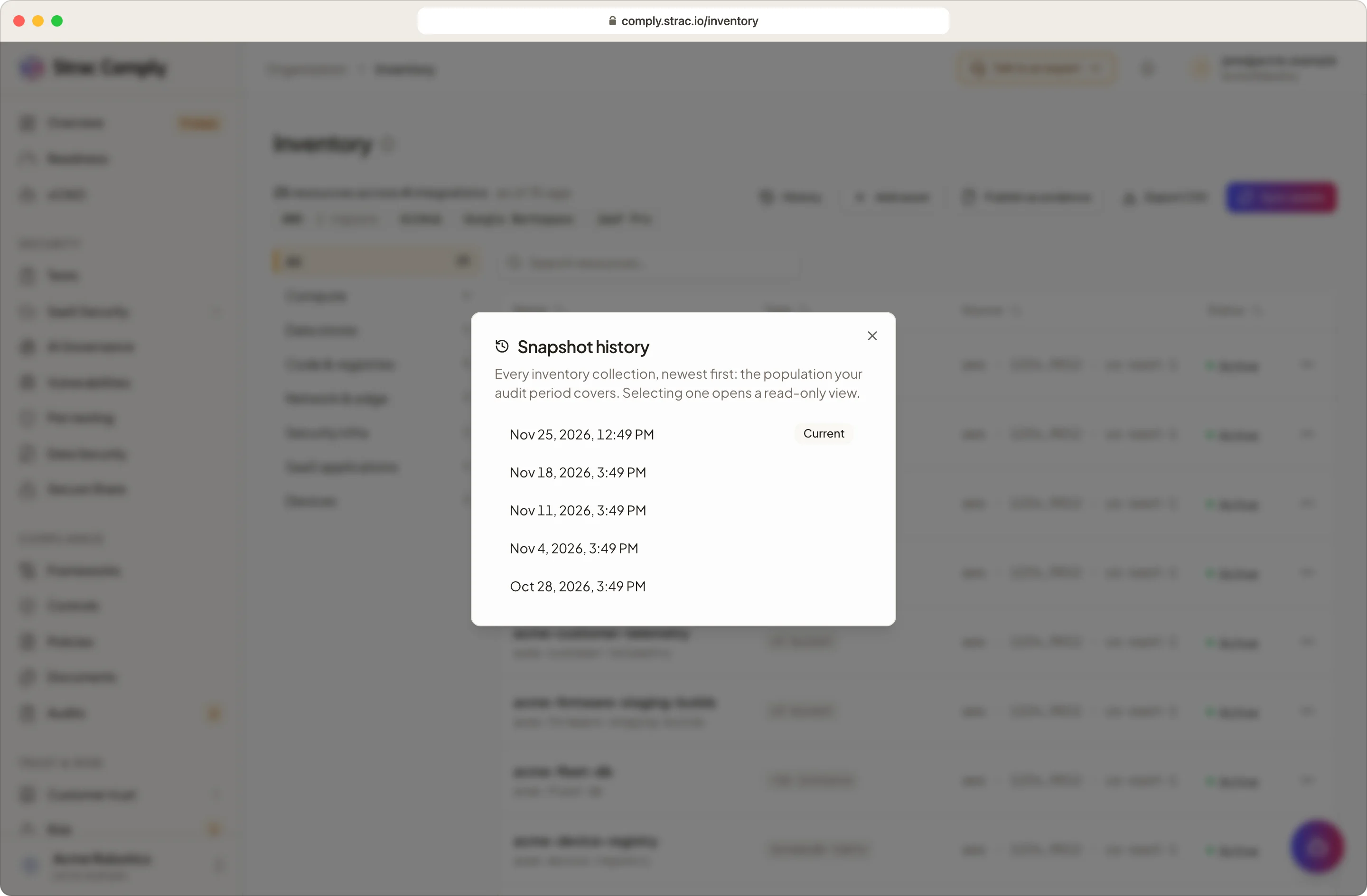
Click Publish as evidence to file the current snapshot. Click History to open a past one.
Use Add asset for anything no integration sees, such as an office server, a physical device or a third-party service. Use Edit details on a row to record its owner and whether it holds sensitive data.
For SOC 2, ISO 27001, HIPAA, NIST CSF and CCPA, Strac Comply checks your latest snapshot each day. It can file a new asset inventory document when a recent snapshot gives a different report. During the daily refresh, a file you uploaded and published yourself stays current. For PCI DSS, click Publish as evidence to file it as your system component inventory.
What does the inventory collect?
Strac Comply collects assets from the tools below. Every other tool you connect shows as one row under SaaS applications.
| Integration type | Tools |
|---|---|
| Cloud | AWS, DigitalOcean, Microsoft Azure and Google Cloud Platform |
| Network | Tailscale |
| Development | GitHub, GitLab and Bitbucket |
| Security / Network | Cloudflare |
| Identity | Google Workspace, JumpCloud, Microsoft Entra ID, Okta and OneLogin |
| Device Management | Jamf Pro and Iru (Kandji) |
| Endpoint Security | CrowdStrike |
| Hosting | Heroku, Netlify, Vercel and Render |
| Database | Supabase |
| Communication | Slack |
| Category | What you find there |
|---|---|
| Compute | Virtual machines, containers, Kubernetes clusters and serverless functions |
| Data stores | Storage buckets, databases, disks and queues |
| Code & registries | Code repositories and container registries |
| Network & edge | Networks, firewall rules, load balancers, DNS and CDN |
| Security infra | Encryption keys, secrets, certificates and service accounts |
| SaaS applications | Your connected SaaS tools and the apps your connected services report as configured, authorized or installed |
| Devices | Managed Macs, phones, tablets and other enrolled devices |
| Other | Cloud accounts, projects, subscriptions and anything else |
| Field | What it tells you |
|---|---|
| Name and type | What the asset is, as the source tool names it |
| Source | The integration that reported it, or Manual for an asset you added |
| Owner | The person or team you recorded as responsible for it |
| First seen | When Strac Comply first collected it |
| Status | Its status, such as Active, or Excluded with the reason and any end date |
| Sensitive | Marked when you record that it holds sensitive data |
Export CSV gives you the full snapshot, not only the page you are on.
Which controls does the asset inventory cover?
Your published inventory files as the Asset Inventory / System Inventory document, and for PCI DSS as the CDE System Component Inventory. They count toward these controls.
| Framework | Controls |
|---|---|
| SOC 2 |
|
| ISO 27001:2022 |
|
| PCI DSS v4.0.1 |
|
| NIST CSF 2.0 |
|
| CCPA |
|
Codes use each framework's own numbering: SOC 2 Trust Services Criteria, ISO/IEC 27001:2022 Annex A, PCI DSS v4.0.1 and NIST CSF 2.0. HIPAA codes cite sections of 45 CFR Part 164. CCPA codes cite the CCPA statute and its regulations.
Frequently asked questions
Is the inventory live?
It is a snapshot. Strac Comply collects a new one on a schedule and each time you click Sync assets. The page shows when it was collected.
What happens when I exclude an asset?
Checks that support exclusions leave it out on their next run. Your auditor sees your reason in the next inventory shared with their audit. Add an end date, and it counts again after that day.
Can I add assets that no integration sees?
Yes. Click Add asset to add one, or import a CSV. Each row needs a name and a type. Category, owner and notes are optional.
Where are employee computers?
On Personnel > Computers. Devices that Jamf Pro, Iru (Kandji) and other device tools report also show here under Devices.
What does my auditor see?
The copy of your inventory shared for their audit, including what you excluded and why.
Who can change the inventory?
Owners and admins sync, add, exclude and publish. Everyone in your workspace can view the list and export a collected snapshot.
Questions that apply to every guide, such as who needs an account, are in the guides FAQ.
Next steps
- Computers through MDMBring your Jamf Pro and Iru (Kandji) Macs in as evidence.
- Integrations and automated testsConnect the tools your inventory is collected from.
- ISO 27001See how Annex A 5.9 and the other ISO 27001 controls are evidenced.
New to Strac Comply? Start free trial.