Computers through MDM
Connect Jamf Pro, Iru (Kandji) and Microsoft Intune once. Strac Comply checks your managed computers daily by default and keeps each result as audit evidence, with or without the Strac Endpoint Agent.
- Works with
- Jamf Pro, Iru (Kandji) and Microsoft Intune
- Required checks per MDM
- Jamf Pro 6, Iru (Kandji) 5, Microsoft Intune 3
- Counts toward
- SOC 2, ISO 27001, PCI DSS, NIST CSF, HIPAA and CCPA
Last checked November 25, 2026
How do I check MDM computers from my AI agent?
Ask your agent which computers need attention. It reads the rows on the Computers page, plus the required and recommended Jamf Pro, Iru (Kandji) and Microsoft Intune checks.
| MCP tool | Access | What you use it for |
|---|---|---|
| list_devices | Read | Computers on the Computers page, from the Strac Endpoint Agent, Jamf Pro, Iru (Kandji) or another device agent, with their owner, status and checks. Up to 500 per answer by default. |
| list_tests | Read | Your Jamf Pro, Iru (Kandji) and Microsoft Intune checks, with what each one found. |
| get_test_result | Read | One check result, with up to 50 of the findings that failed it. |
| rerun_test | Write | Runs one check again after you fix a device. |
| list_integrations | Read | Which MDMs you connected, and the last recorded status of each connection. |
Try these prompts
- Which Macs fail the FileVault check?
- Which people have a Mac in Jamf but no Strac agent?
- Which computers have not checked in for a week?
- Show me the Intune devices without an encrypted disk.
- Run the Iru (Kandji) firewall check again.
What your agent gets back. Counts first, such as computers with issues and computers not reporting. Then one row per computer with its owner email, its source and each check as pass, fail, unknown, excluded or not measured. Compare the number returned with the number matched, and read the notes about missing data.
First time? Connect your agent once, then ask.
How do I connect Jamf Pro, Iru (Kandji) or Microsoft Intune?
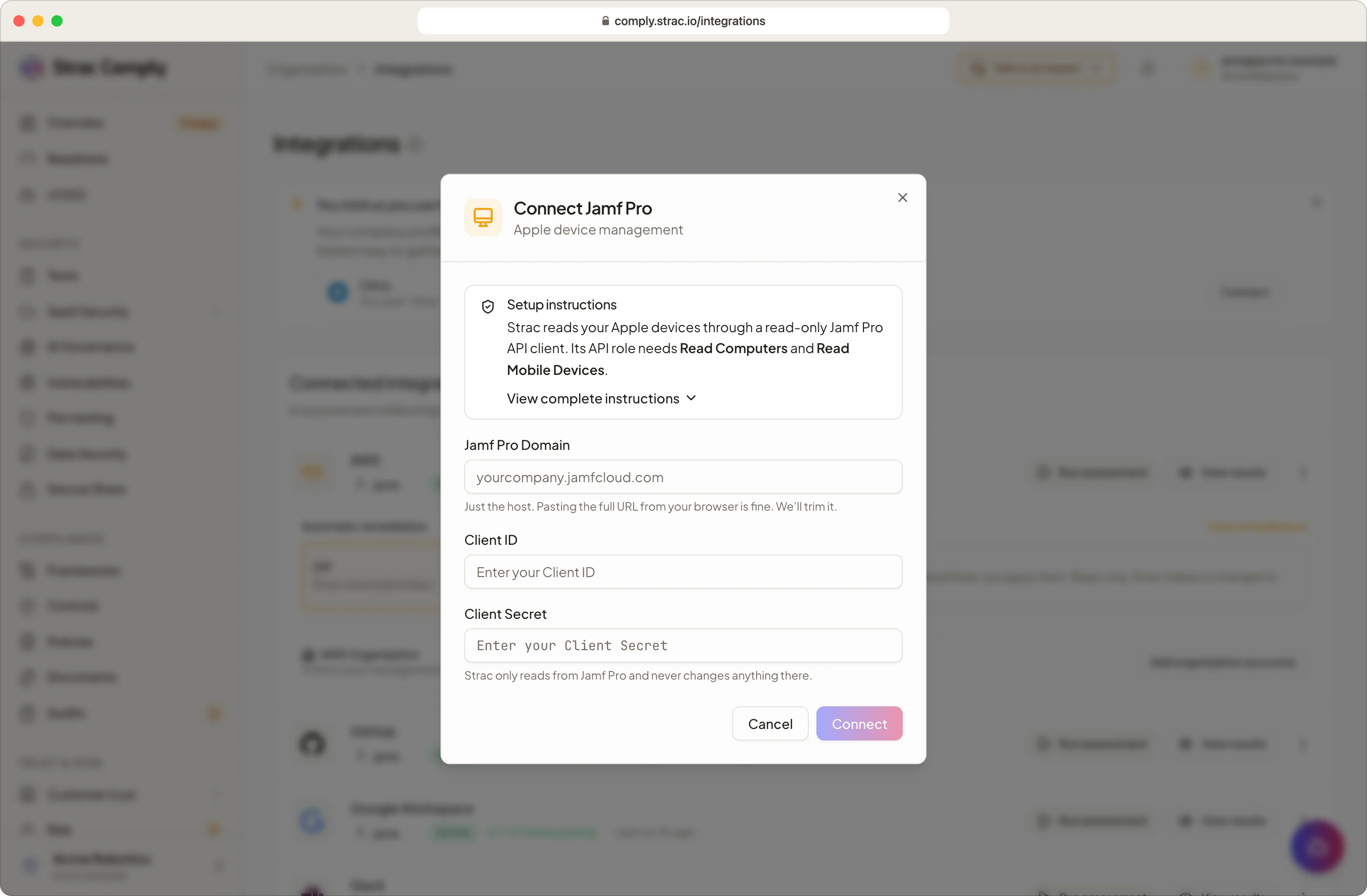
Each MDM connects with a key you create in its admin console. Give it the read permissions below. Strac Comply only reads from your MDM and never changes a device or a policy.
Admin
Step 1: Connect your MDM
Open Integrations and pick Jamf Pro, Iru (Kandji) or Microsoft Intune. Follow the steps in the dialog to create a key with read permissions.
Admin
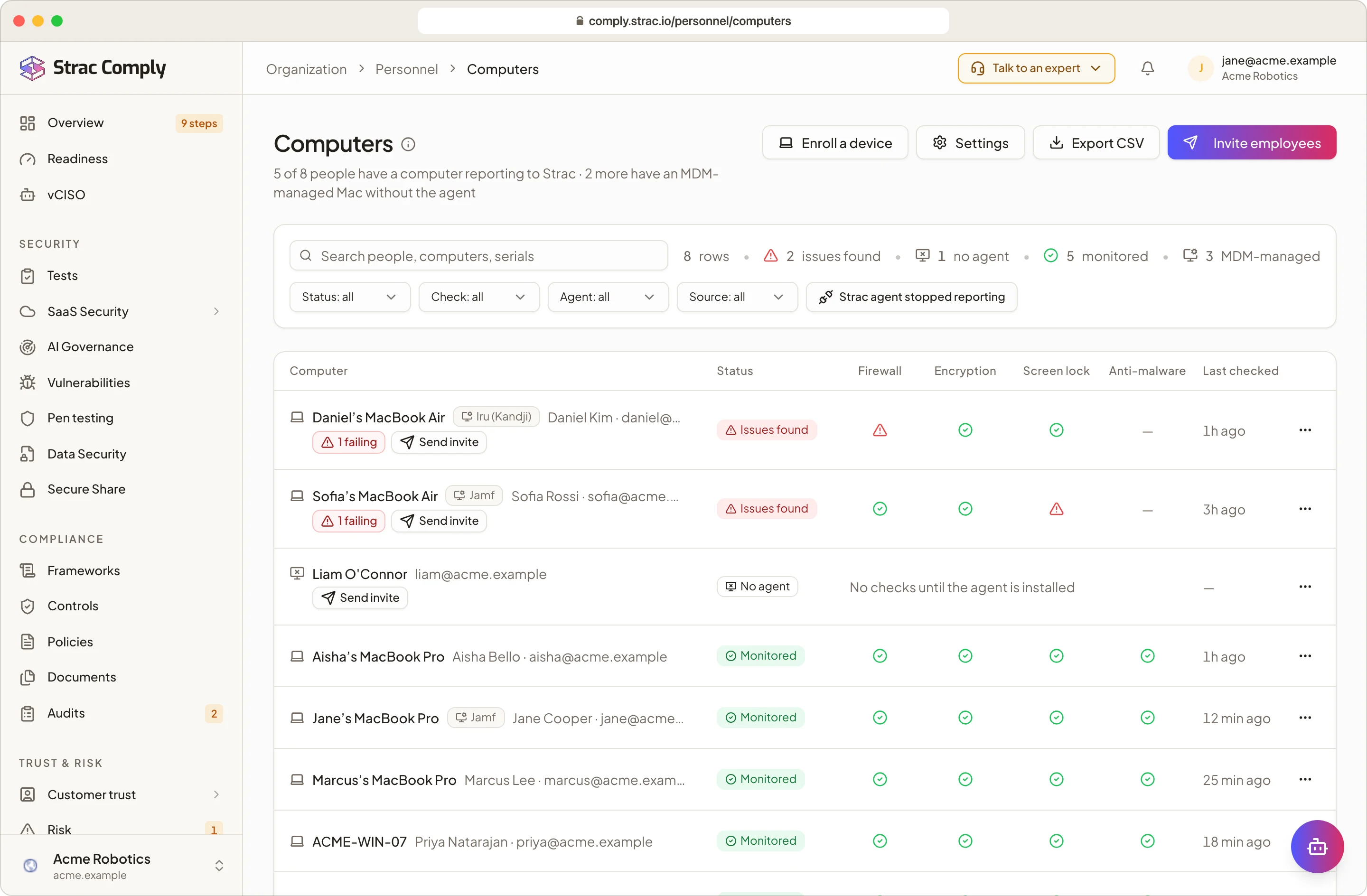
Step 2: See every computer
Open Personnel > Computers. Use Source to show only the Macs Jamf Pro or Iru (Kandji) reports.
Admin
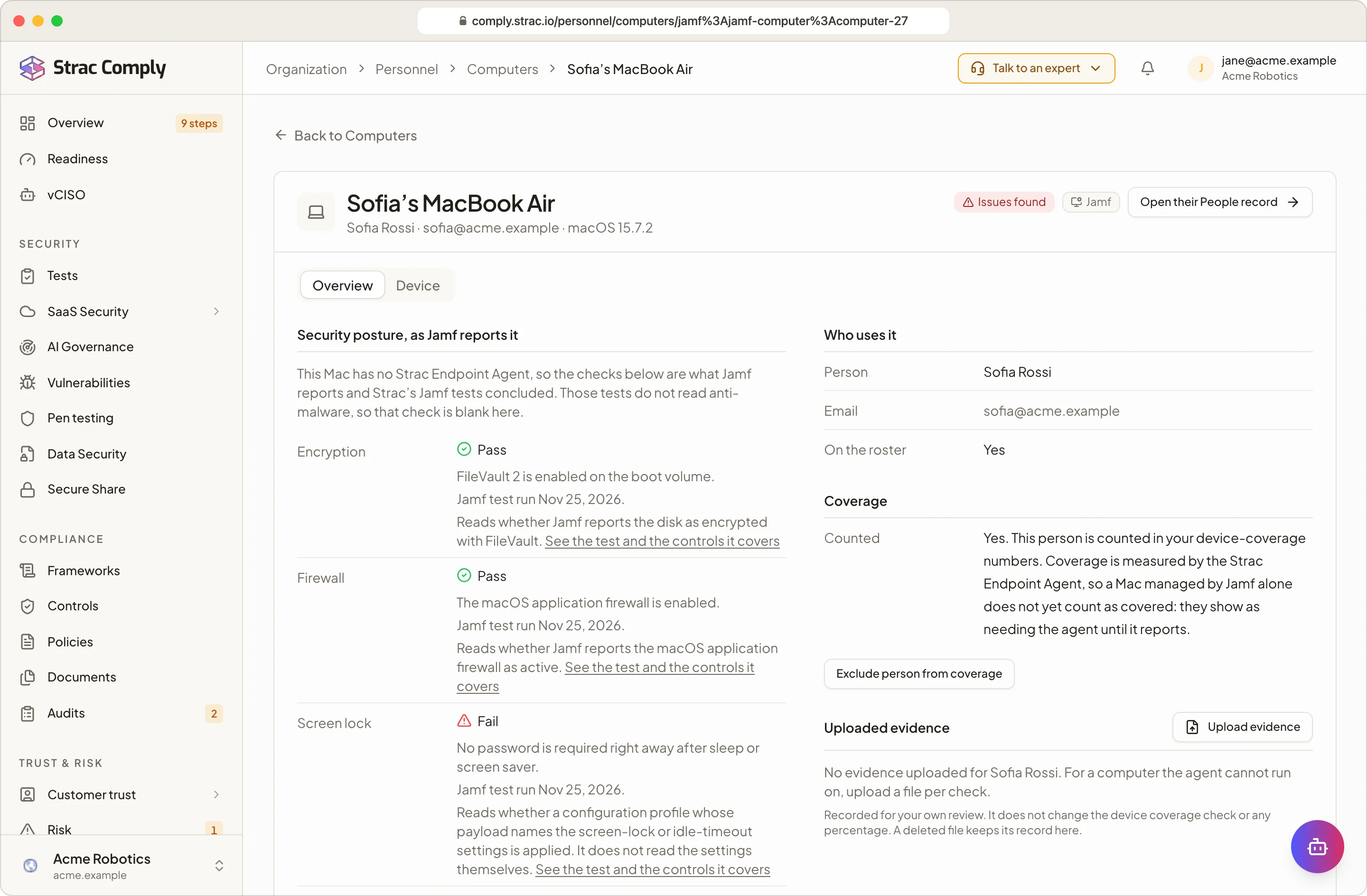
Step 3: Open one Mac
Click a Mac. Its record shows your MDM's disk encryption, firewall, screen lock, OS version and check-in readings, each with its date.
| MDM | What you create | Permissions |
|---|---|---|
| Jamf Pro | An API role and an API client with a client secret | Read Computers and Read Mobile Devices. For the recommended checks, also Read macOS Configuration Profiles and Read Managed Software Updates |
| Iru (Kandji) | An API token | Device List, Device Details, and the Prism reads for FileVault, Application Firewall, Profiles and Startup Settings. For the password manager check, also Prism Apps |
| Microsoft Intune | An app registration in Microsoft Entra with a client secret | DeviceManagementManagedDevices.Read.All and DeviceManagementConfiguration.Read.All, with admin consent. If you use Microsoft Defender for Endpoint, also add Machine.Read.All from WindowsDefenderATP for its antivirus reports |
The connect dialog shows each step in your MDM's own admin console. You copy the key into Strac Comply when you connect. Replace an Intune client secret before it expires.
Do I need the Strac Endpoint Agent too?
No. A Mac in Jamf Pro or Iru (Kandji) shows on Computers with no agent. Its checks come from your MDM, and its owner is the user your MDM assigns to it.
When the agent and your MDM report the same serial number for a Mac, you see one row. The record shows what each one reports.
The coverage count at the top of Computers counts people whose computer reports through the Strac Endpoint Agent or another device agent. People with only an MDM Mac show next to it. Owners and admins can click Send invite to ask them to install the agent.
Microsoft Intune checks show on the Tests page. Open one to see which devices it assessed. Add the agent to see each Windows PC on Computers.
What does each MDM check?
These are the checks that count toward your controls. They run daily by default, and each one maps to the controls in the next section. Some MDMs also run further checks, such as screen lock on Jamf Pro and Iru (Kandji), and pending macOS updates on Jamf Pro.
| MDM | Check |
|---|---|
| Jamf Pro | Chrome, Edge and Firefox on managed Macs are on a supported version |
| Jamf Pro | MDM Enrollment: Computers listed in Jamf are enrolled |
| Jamf Pro | OS Version Compliance: Devices running supported OS versions |
| Jamf Pro | FileVault Encryption: Disk encryption enabled on all Macs |
| Jamf Pro | Firewall Enabled: macOS firewall active on all devices |
| Jamf Pro | Gatekeeper Enabled: Gatekeeper is on for managed Macs |
| Iru (Kandji) | MDM Enrollment: Computers listed in Iru (Kandji) are enrolled |
| Iru (Kandji) | OS Version Compliance: Macs running supported macOS versions |
| Iru (Kandji) | FileVault Encryption: Disk encryption enabled on all Macs |
| Iru (Kandji) | Firewall Enabled: macOS application firewall active on all Macs |
| Iru (Kandji) | System Integrity Protection: SIP enabled on all Macs |
| Microsoft Intune | Chrome, Edge and Firefox on Intune-managed devices are on a supported version |
| Microsoft Intune | Microsoft Defender Antivirus is active and no assigned policy leaves threats in place |
| Microsoft Intune | Devices managed by Intune have an encrypted disk |
On a Mac with no agent, the record also shows whether a screen lock profile was found and when your MDM last heard from it. Anti-malware stays blank there, because the agent is what reads it.
Which controls do MDM computers cover?
The MDM checks above count toward these controls.
| Framework | Controls |
|---|---|
| SOC 2 |
|
| ISO 27001:2022 |
|
| PCI DSS v4.0.1 |
|
| NIST CSF 2.0 |
|
| HIPAA Security Rule |
|
| CCPA |
|
Codes use each framework's own numbering: SOC 2 Trust Services Criteria, ISO/IEC 27001:2022 Annex A, PCI DSS v4.0.1 and NIST CSF 2.0. HIPAA codes cite sections of 45 CFR Part 164. CCPA codes cite the CCPA statute and its regulations.
Frequently asked questions
Do I need the Strac Endpoint Agent if I use an MDM?
No. Jamf Pro and Iru (Kandji) Macs show on Computers and are checked through your MDM. The agent adds more checks, such as anti-malware, and covers Windows and Linux.
How does Strac Comply match an MDM Mac to the agent?
By the serial number. You see one row, and the record shows what the agent and your MDM each report.
Who owns a Mac that only my MDM sees?
The user your MDM assigns to it. Assign the Mac to the person's work email in your MDM. After the next inventory sync, the Mac shows under that person. That runs every 48 hours, or when an admin clicks Sync assets on Inventory.
Does Strac Comply change anything in my MDM?
No. It reads with the read-only key you create. It never changes a device or a policy.
How fresh are the results?
The checks run daily by default. Each result shows its run date when one was recorded. The list of Macs and their owners refreshes with the inventory snapshot, every 48 hours or when an admin clicks Sync assets. On a computer record, a reading older than 7 days shows No recent run.
Can I roll out the agent with my MDM?
Yes. Owners and admins click Enroll a device on Personnel > Computers and open the steps for your MDM. The Endpoint Agent guide explains the agent.
Questions that apply to every guide, such as who needs an account, are in the guides FAQ.
Next steps
- Strac Endpoint AgentAdd the agent for more checks on macOS, Windows and Linux.
- Asset inventorySee your Jamf Pro and Iru (Kandji) computers next to your cloud and code assets.
- Vulnerability managementTrack pending macOS updates alongside your other vulnerability findings.
New to Strac Comply? Start free trial.