People: onboarding, offboarding and background checks
See the people at your company and what each one still owes: MFA, training, policies and a background check. Run onboarding and offboarding checklists, and keep the proof for your audit.
- Reads people from
- Google Workspace, Okta, Microsoft Entra ID, JumpCloud and your HR system
- Background checks
- From Checkr, a CSV import, or recorded by hand
- Counts toward
- SOC 2, ISO 27001, PCI DSS, NIST CSF, HIPAA and CCPA
Last checked November 27, 2026
How do I check my people from my AI agent?
Ask your agent who joined, who left and what each person still owes. It reads your People roster and your checklists, with their last saved checks.
| MCP tool | Access | What you use it for |
|---|---|---|
| list_employees | Read | People on your People page, active accounts by default, with each person's MFA, training, background check and policy status. For a viewer, it leaves out termination dates. |
| list_lifecycle_checklists | Read | Onboarding and offboarding checklists, with their state and how many required items are done. Not for viewers. |
| get_lifecycle_checklist | Read | One checklist item by item, with who last changed each manual step and when. Not for viewers. |
| list_devices | Read | Work computers, with each one's owner when known. |
Try these prompts
- Who still needs a completed background check?
- Which offboarding checklists closed in the last 90 days?
- Which offboarding checklists still have open items?
- Which current people are missing MFA or training?
What your agent gets back. One row per person, checklist or computer. If a roster read fails, the answer says so.
First time? Connect your agent once, then ask.
How do I run onboarding and offboarding in the dashboard?
Connect Google Workspace or your identity provider. Connect your HR system too, so Strac Comply knows who joined and who left.
Admin
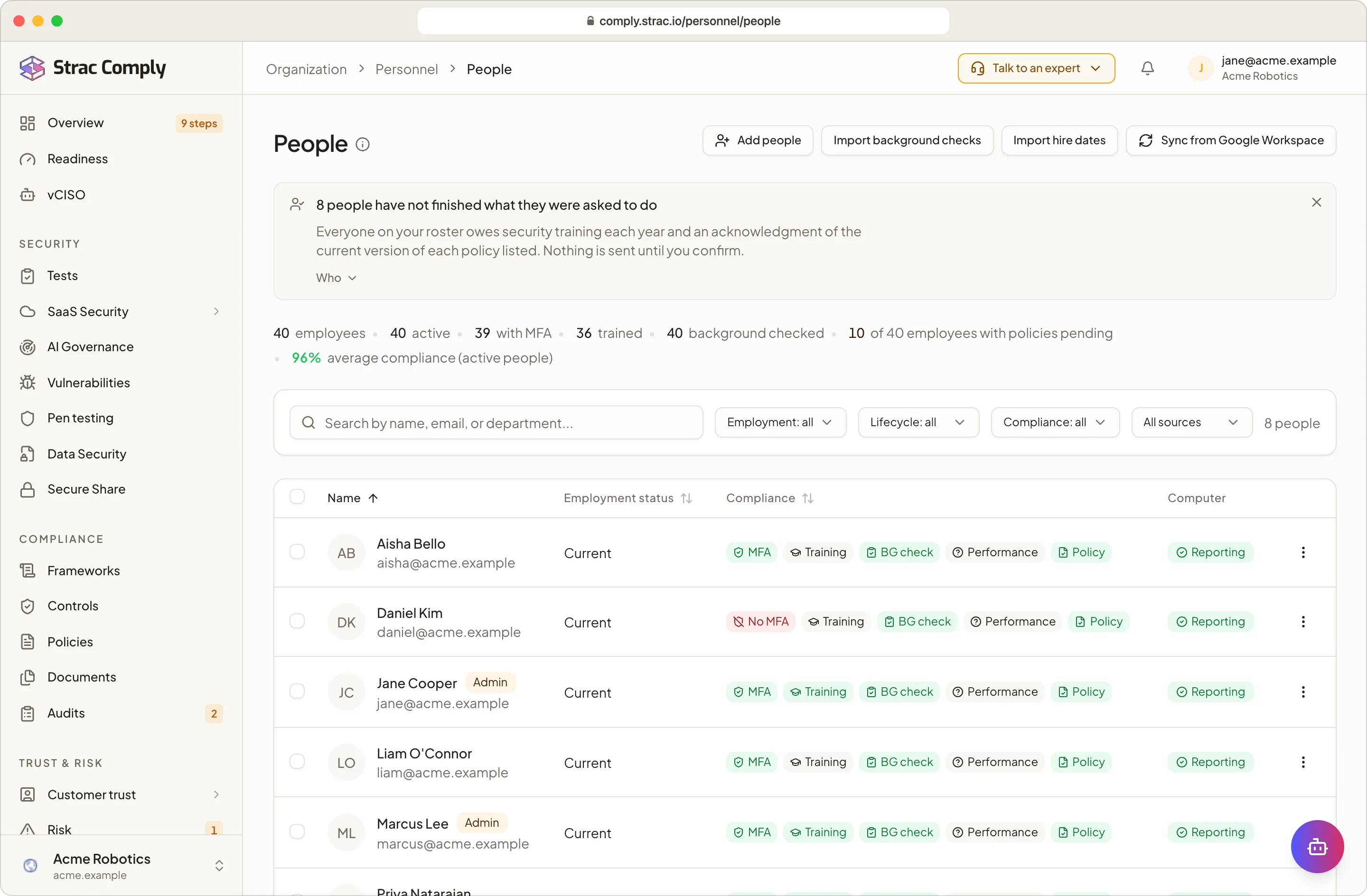
Step 1: See what each person owes
Open Personnel > People. Each row shows MFA, training, background check and policies, where they apply to that person.
Admin
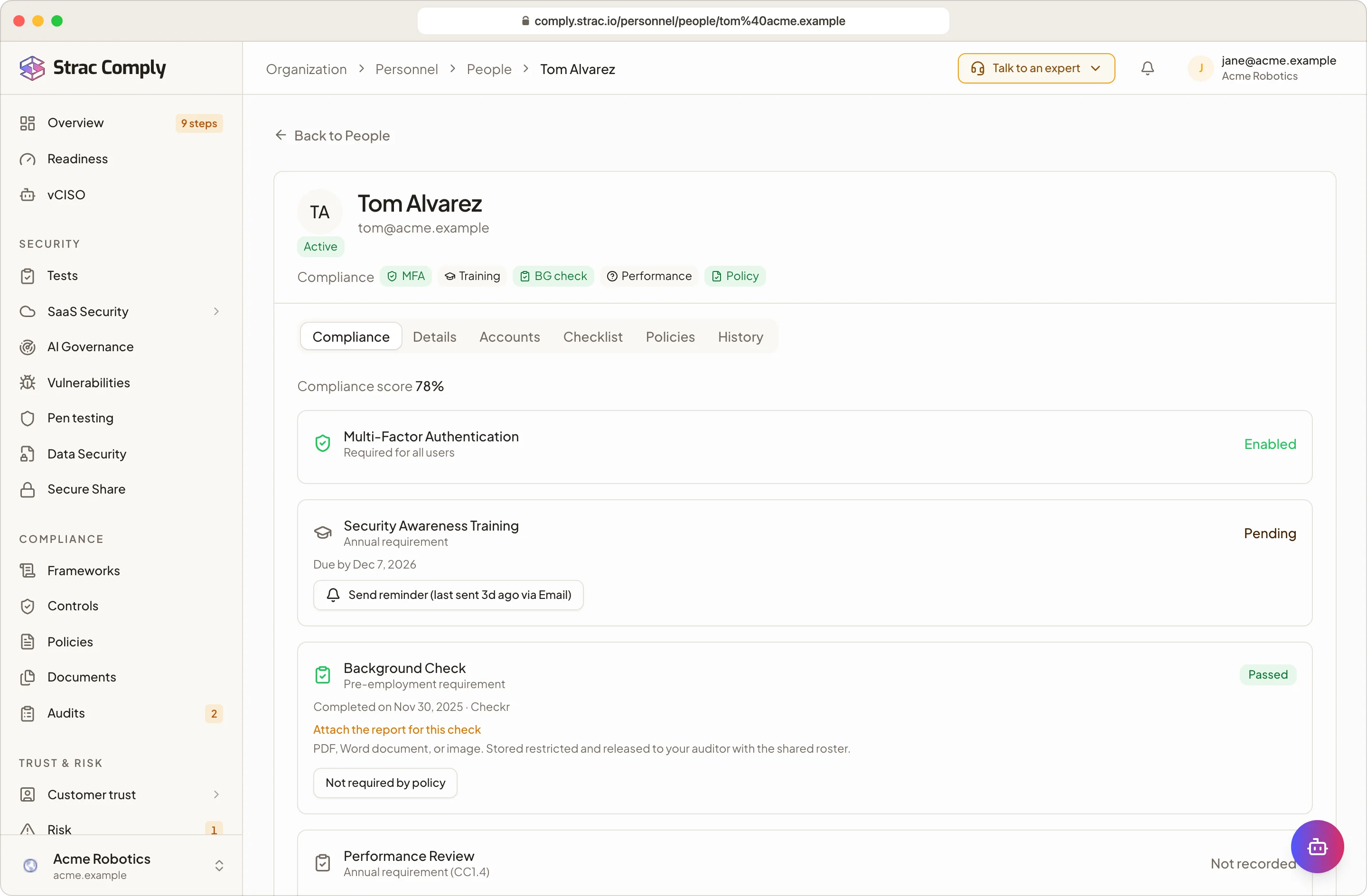
Step 2: Record a background check
Open a person and stay on Compliance. Click Record external check for a passed screening, or Not required by policy for an exempt role.
Admin
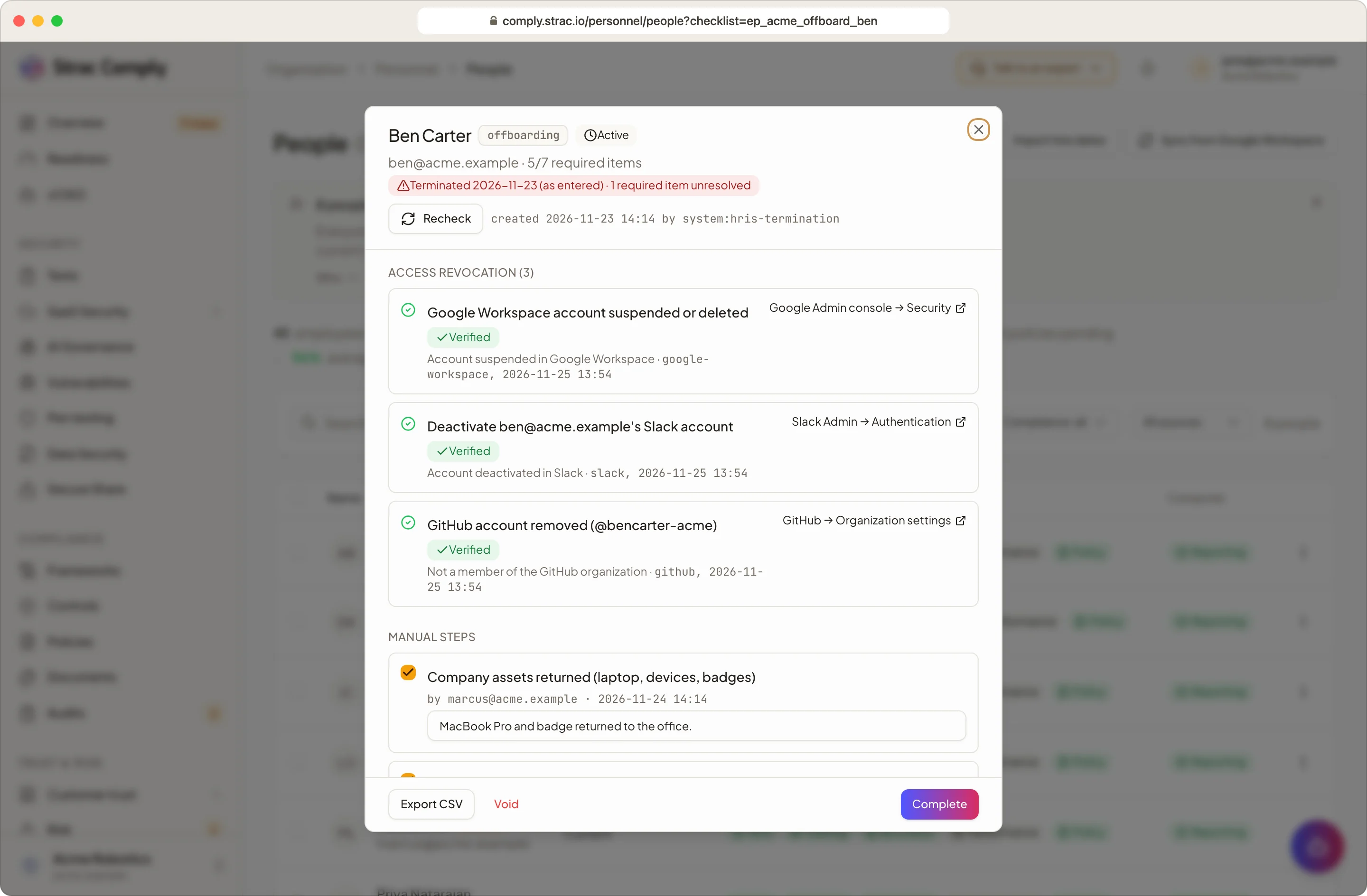
Step 3: Run the offboarding checklist
Pick Start offboarding from the person's row menu. Tick the manual steps, then click Complete and confirm.
When your HR system marks someone as terminated, the daily check starts their offboarding checklist. If more than 10 departures are waiting, it starts none and asks your admins to review them. A person only suspended in Google Workspace is listed for you to start yourself.
Each manual step records who ticked it and when. Complete lists any required item still open, and you can confirm once all are done. Completing checks the automatic items again and locks the checklist as audit evidence. Export CSV gives you a copy.
Use Start onboarding the same way for a new hire. To start one by hand, the person needs a Google Workspace account. Connect Checkr to order and read background checks, or click Import background checks to load a CSV.
What do the onboarding and offboarding checklists cover?
Strac Comply checks automatic items against your connected tools and your People records. An admin ticks each manual item. Google Workspace items appear when Google Workspace is connected.
| Checklist | Item | Checked by |
|---|---|---|
| Onboarding | Google Workspace account active | Strac Comply |
| Onboarding | MFA enrolled in Google Workspace | Strac Comply |
| Onboarding | Background check completed | Strac Comply |
| Onboarding | Security awareness training completed | Strac Comply |
| Onboarding | Security policies acknowledged | Strac Comply |
| Onboarding | Access approved by the manager | An admin |
| Onboarding | Equipment issued and recorded (optional) | An admin |
| Offboarding | Google Workspace account suspended or deleted | Strac Comply |
| Offboarding | Accounts removed in supported connected tools, such as Slack and GitHub | Strac Comply, or an admin for tools it cannot check |
| Offboarding | Company assets returned | An admin |
| Offboarding | Physical access revoked | An admin |
| Offboarding | Confidentiality duties after leaving communicated | An admin |
| Offboarding | Owned resources transferred (optional) | An admin |
Each completed offboarding becomes a row in your Employee Termination Checklist register, which Strac Comply files as evidence. If you publish your own file there, Strac Comply leaves it in place.
The New Hire Onboarding Checklist is a written process document. Draft it or upload your own on the Documents page.
Which controls do people records cover?
Background checks, the onboarding checklist and the offboarding register support the controls below.
| Framework | Controls |
|---|---|
| SOC 2 |
|
| ISO 27001:2022 |
|
| PCI DSS v4.0.1 |
|
| NIST CSF 2.0 |
|
| HIPAA Security Rule |
|
| CCPA |
|
Codes use each framework's own numbering: SOC 2 Trust Services Criteria, ISO/IEC 27001:2022 Annex A, PCI DSS v4.0.1 and NIST CSF 2.0. HIPAA codes cite sections of 45 CFR Part 164. CCPA codes cite the CCPA statute and its regulations.
Frequently asked questions
Where does the People list come from?
From Google Workspace, your identity provider and your HR system, one row per work email. An owner or admin can also click Add people.
Does Strac Comply run background checks?
No, Checkr runs them. Once Checkr is connected, an owner or admin can click Order check on a person. You can also import a CSV, or record a passed check you ran elsewhere.
What if a role does not need a background check?
Click Not required by policy on that person and record the reason. While the exemption is active, the person's score leaves out the missing check.
Does Strac Comply remove access for me?
No. You remove access in each tool. The checklist checks the supported tools, or asks an admin to confirm them, and records the result. Keep your own record for other systems.
Who can run checklists?
Owners and admins start, tick and complete checklists. Members can view them. Viewers see who is on the People page and whether they have left. They do not see termination dates or checklists, and cannot open the Employee Termination Checklist register.
What does my auditor get?
The Employee Termination Checklist register and your background check records, as saved in their audit.
Questions that apply to every guide, such as who needs an account, are in the guides FAQ.
Next steps
- Security awareness trainingAssign the built-in training and keep the completion records.
- SaaS security and access reviewsFind accounts that still work after a person left, and review access.
- Endpoint AgentCheck the work computer each person uses.
- Security policiesDraft the policies each new hire accepts.
- SOC 2 requirements and evidenceSee where people controls fit in SOC 2.
New to Strac Comply? Start free trial.