Security awareness training
Assign security awareness training to your team, with courses and quizzes built in. See who has finished, send reminders, and keep the completion records for your audit.
- Built-in course
- 5 core modules, about 28 minutes, with a short quiz on each
- Already on KnowBe4
- Connect it. Its completions can count toward your training records
- Counts toward
- SOC 2, ISO 27001, PCI DSS, NIST CSF, HIPAA and CCPA
Last checked November 25, 2026
How do I check training from my AI agent?
Ask your agent who still owes training. It reads the same People roster you see in the dashboard, with each person's training state.
| MCP tool | Access | What you use it for |
|---|---|---|
| list_employees | Read | People on your People page, active accounts by default, with each person's training, MFA, policy and background check status. |
| get_compliance_status | Read | Your readiness for each framework. |
Try these prompts
- Who has not finished security training yet?
- Which people in Engineering still owe training?
- How ready are we for SOC 2 right now?
- Which current people owe both training and policy sign-off?
What your agent gets back. One row per person, with training as met, not met, excused, not applicable or unavailable. Unavailable means Strac Comply could not read it, so check again before you send a reminder.
Assign training in the dashboard.
First time? Connect your agent once, then ask.
How do I run security training in the dashboard?
Connect your directory, such as Google Workspace or Okta, or add people on the People page. Check the roster before you start a cycle.
Admin
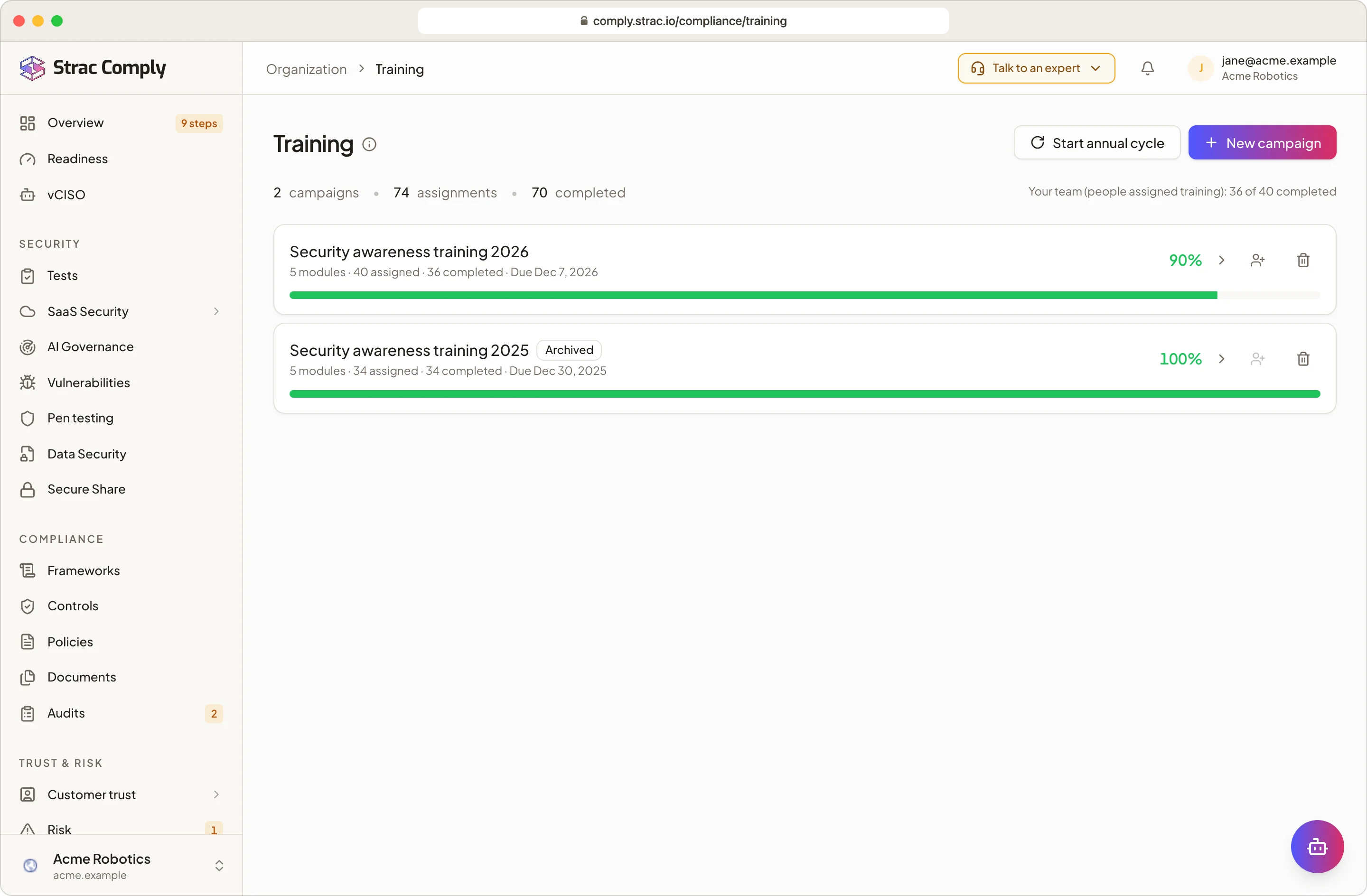
Step 1: Start the annual cycle
Open Training and click Start annual cycle. It assigns the five core modules to everyone on your roster, except suspended or deleted accounts.
Employee
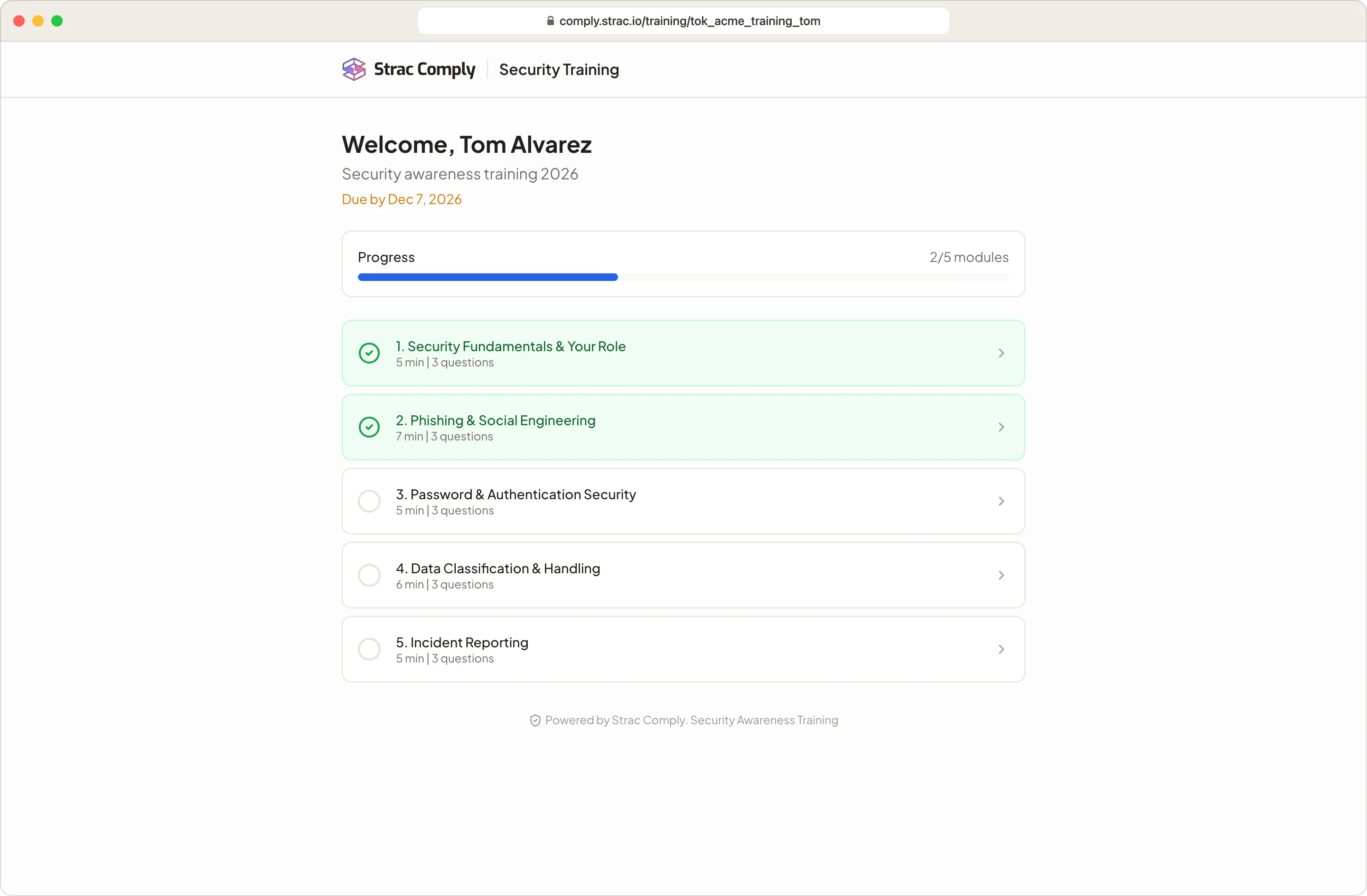
Step 2: Take the training
Each person gets their own training link by email. They read each module and answer its three questions.
Admin
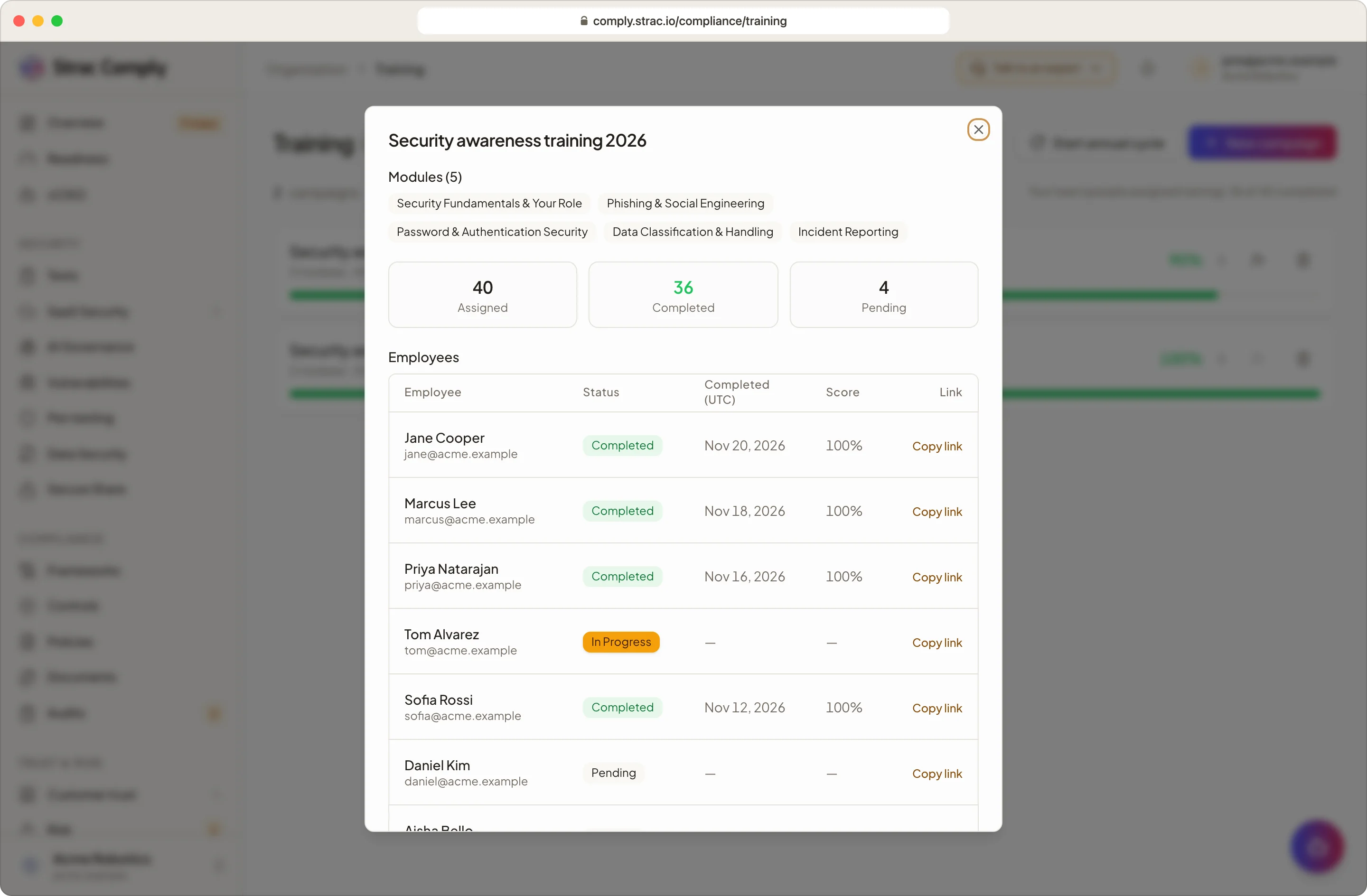
Step 3: Check the completion records
Open a campaign to see each person's status, completion date and score. Remind a late person from their People record.
Use New campaign to choose who gets the core modules and when they are due. After you create a campaign, Download CSV gives you every person's training link. If an invitation did not send, People can offer Send training email again.
A person passes a module by answering all three questions right. They can try again, and a module they passed stays passed in that campaign.
On a person's record, Send reminder sends their link again by email. When Slack is connected, you can send it as a Slack message.
What does the built-in training cover?
A campaign you create in the dashboard assigns the five core modules.
| Module | Length | Assigned by |
|---|---|---|
| Security Fundamentals and Your Role | 5 minutes | Annual cycle |
| Phishing and Social Engineering | 7 minutes | Annual cycle |
| Password and Authentication Security | 5 minutes | Annual cycle |
| Data Classification and Handling | 6 minutes | Annual cycle |
| Incident Reporting | 5 minutes | Annual cycle |
| Remote Work and Device Security | 5 minutes | Your choice |
| Privacy and Data Protection | 6 minutes | Your choice |
| AI and Generative AI Security | 5 minutes | Your choice |
Each module ends with a three question quiz.
On the People page, a person's training stays current for up to 365 days after they finish. Start a new cycle each year so your records stay current.
Which controls does security training cover?
Strac Comply counts your campaign records as the Security Awareness Training Completion Records. They count once at least 80% of the training assigned to people in scope is finished. Some controls below also ask for role training, such as secure coding for developers. Keep those records too.
| Framework | Controls |
|---|---|
| SOC 2 |
|
| ISO 27001:2022 |
|
| PCI DSS v4.0.1 |
|
| NIST CSF 2.0 |
|
| HIPAA |
|
| HIPAA Privacy Rule |
|
| CCPA |
|
Codes use each framework's own numbering: SOC 2 Trust Services Criteria, ISO/IEC 27001:2022, PCI DSS v4.0.1 and NIST CSF 2.0. ISO codes that start with A are Annex A controls. Strac Comply adds C before an ISO clause number, so C.7.3 is clause 7.3. HIPAA codes cite 45 CFR Part 164. CCPA codes cite the CCPA regulations.
Frequently asked questions
Do I need my own training content?
No. Five core modules are built in, each with a short quiz.
How long does the training take?
The five core modules take about 28 minutes in total. A module a person passed stays passed in that campaign.
What if we already use KnowBe4?
Connect KnowBe4 on the Integrations page. Strac Comply reads its completions, and they can count toward your training records.
How often must people take it?
PCI DSS 12.6.3 asks for training at hire and at least once a year. Start a new annual cycle each year, and use New campaign for new hires.
What does my auditor get?
The completion records of each campaign in their audit: each person's status, completion date and score.
Questions that apply to every guide, such as who needs an account, are in the guides FAQ.
Next steps
- People: onboarding, offboarding and background checksSee what each person still owes, and run onboarding and offboarding checklists.
- Security policiesDraft and approve the policies your team accepts along with training.
- Endpoint AgentCheck every work computer for encryption, screen lock and updates.
- SOC 2 requirements and evidenceSee where training fits among the SOC 2 controls.
New to Strac Comply? Start free trial.