Secure Share and the dropzone
Send files and secrets through an expiring link instead of an email attachment. Files are encrypted in your browser before upload, and recipients need no account.
- Each package
- Up to 20 files, 250 MB each and 500 MB in total
- Link lasts
- 1 hour to 90 days, 7 days by default
- Who can send
- Every member of your workspace
Last checked November 25, 2026
Can I use Secure Share from my AI agent?
No. You create packages in the dashboard, and no MCP tool sends them. Your agent can find the document you plan to send.
| MCP tool | Access | What you use it for |
|---|---|---|
| list_documents | Read | Your documents with their status, current version and next review date, so you send the right one. |
Try these prompts
- Is our SOC 2 report published and current?
- When is our penetration test report due for review?
- Which of our documents are published and ready to share?
What your agent gets back. Each document with its status, its current version and its next review date.
First time? Connect your agent once, then ask.
How do I send files with Secure Share?
Step 1: Open Secure Share
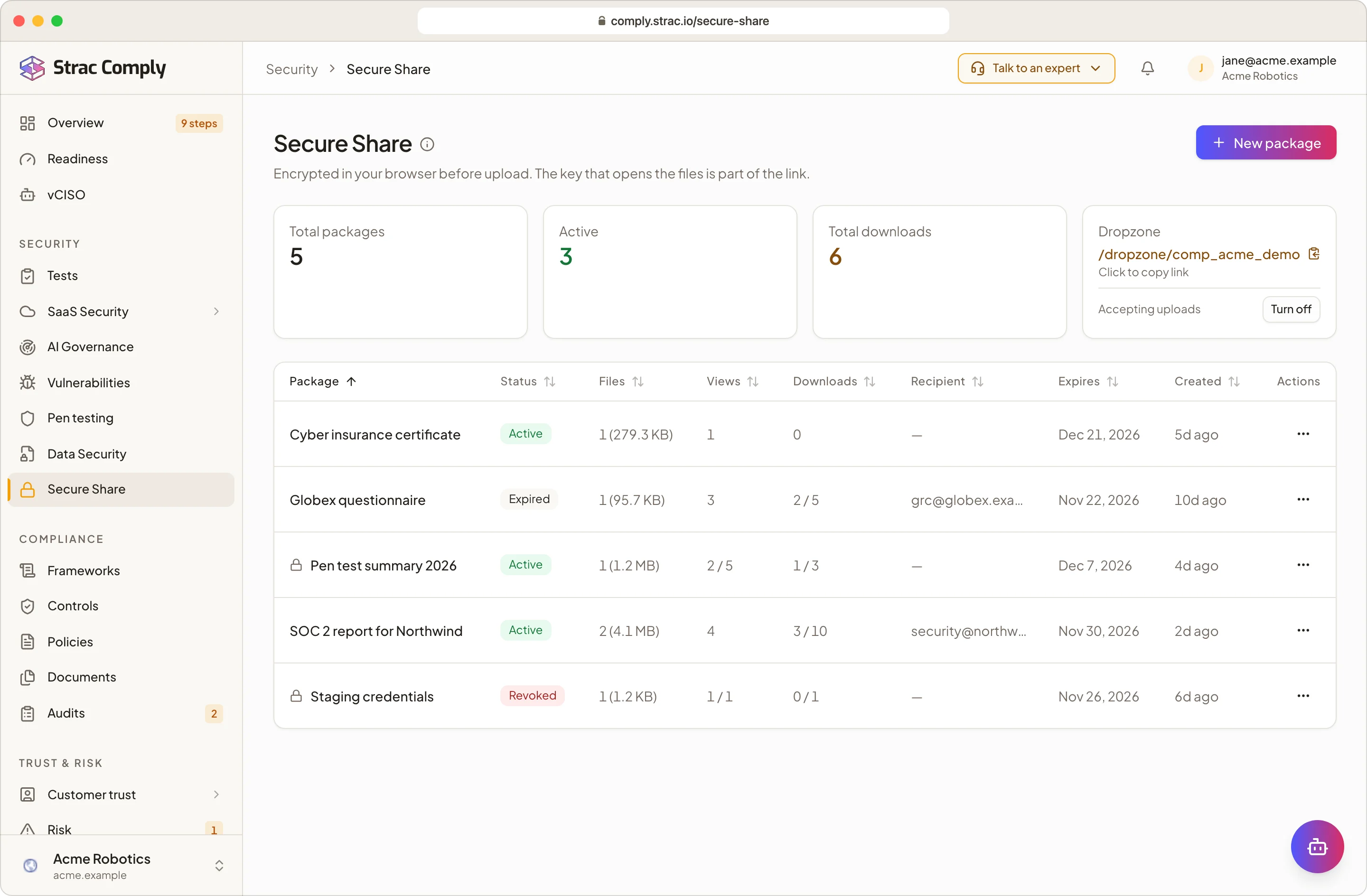
Open Security > Secure Share. Each package shows its status, views, downloads and expiry.
Step 2: Create a package
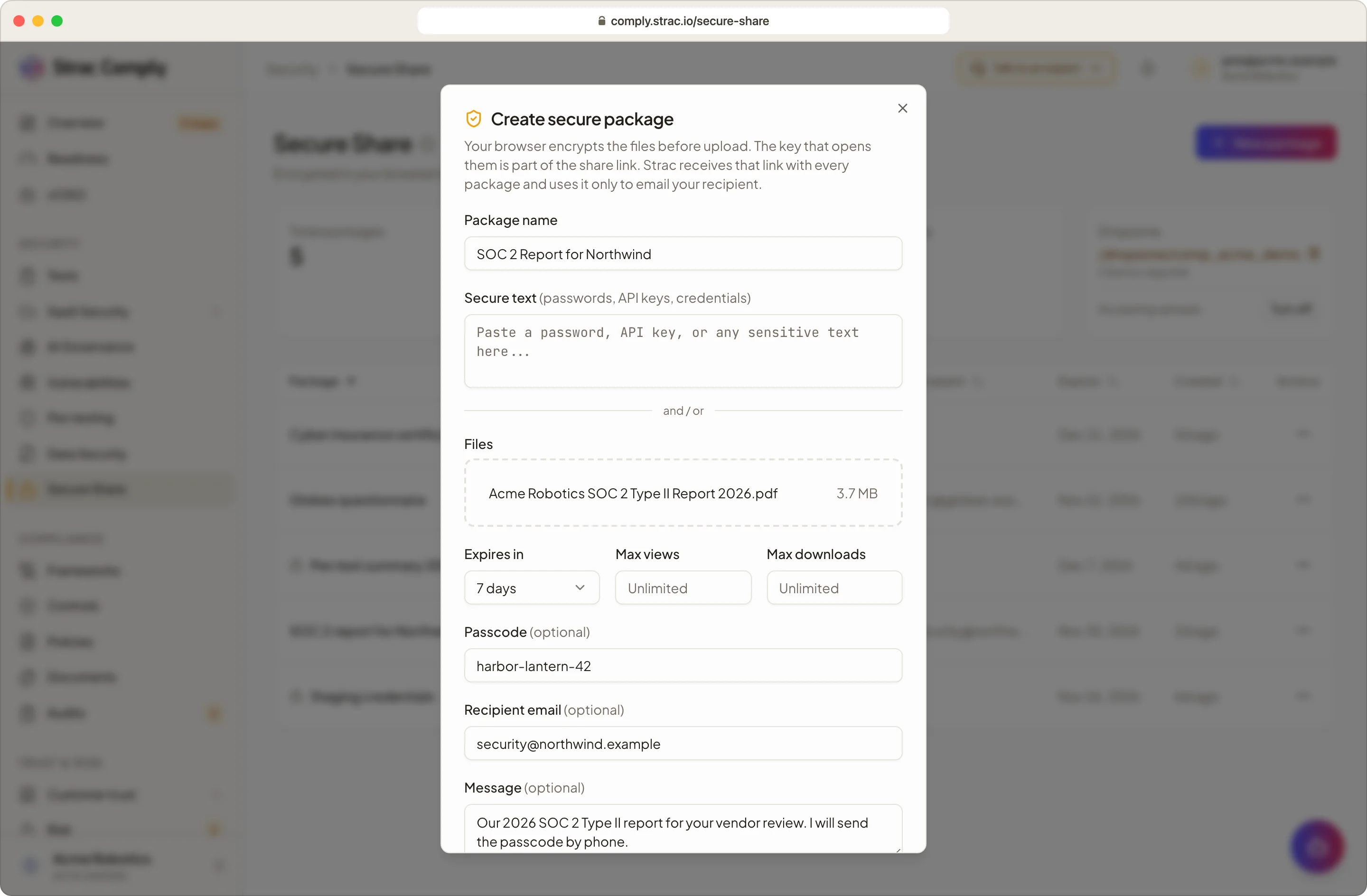
Click New package. Add files, Secure text or both. Set the expiry, a passcode and a recipient email.
Step 3: See recent downloads
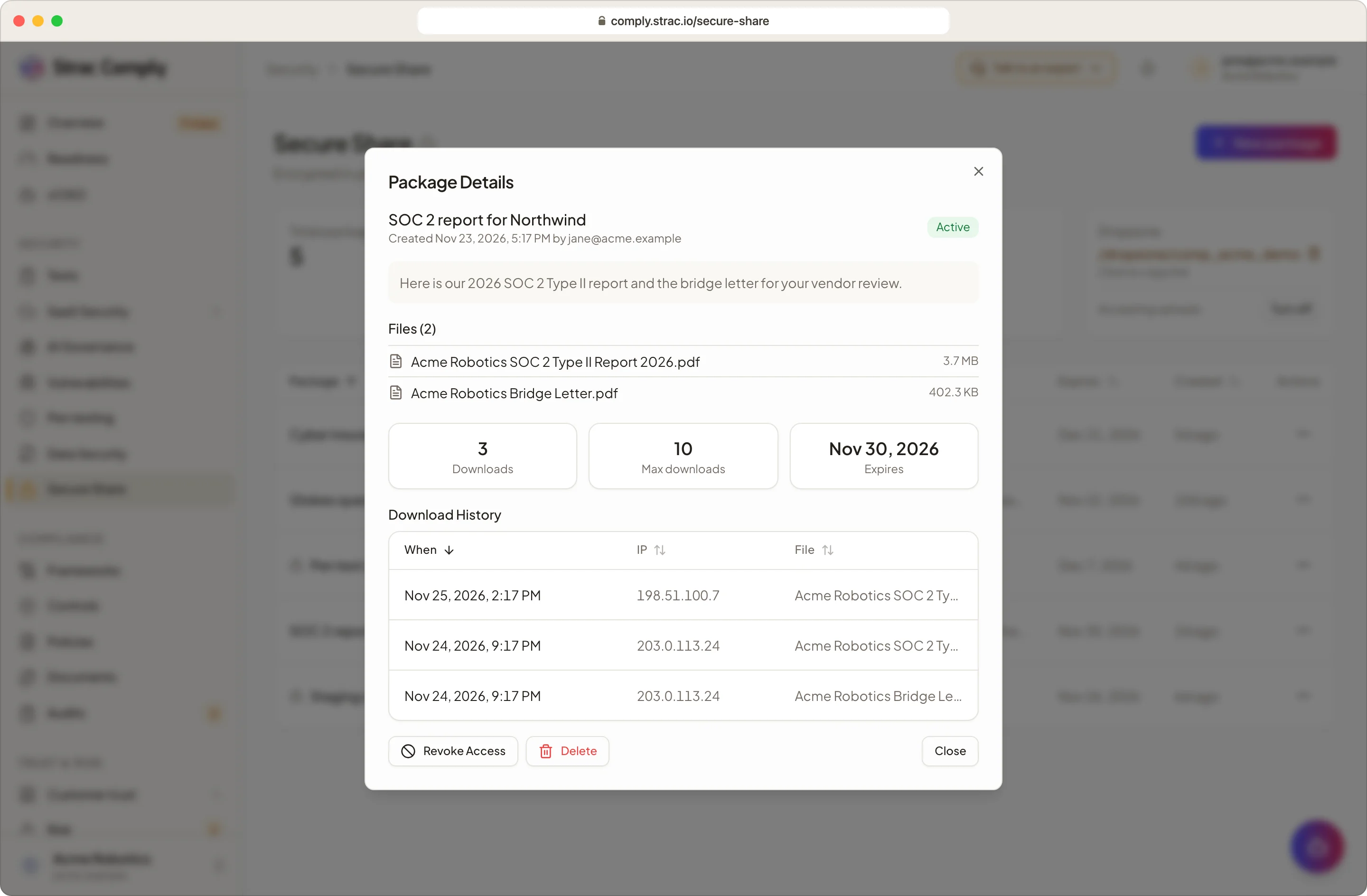
Click a package to see its Download History, with the time and IP of its first 20 downloads. Revoke Access stops the link.
Click Encrypt & share, then Copy the link. With a recipient email, Strac Comply also emails the link to them. Send the passcode another way.
Every member of your workspace can send packages. Only owners and admins can turn the dropzone off or on.
How do people send files to us?
Your dropzone is a public page where anyone can send you files without an account. Copy its link from the Dropzone card on Secure Share.
After each upload on your dropzone page, up to 10 of your owners and admins get an email with a link to the files. Packages sent to you expire after 30 days.
The dropzone is on until an owner or admin clicks Turn off on the Dropzone card. Click Turn on to accept uploads again.
How does Secure Share protect a file?
Each file is encrypted with AES-256-GCM in your browser before upload. The recipient decrypts it in their browser. The key travels in the link, so treat the link like a password.
When you create a package in Strac Comply, your browser sends the link, key included, to Strac Comply, even with no recipient email. Strac Comply uses it only to email the recipient you name, and does not save it with the package. Files sent through your dropzone page differ: Strac Comply keeps their link, key included, with the package. It uses the link only to email your admins, and to retry that email if it fails. No Strac Comply page or API returns the stored link.
| Setting | What it does |
|---|---|
| Expires in | 1 hour, 1 day, 7 days, 30 days or 90 days. The link stops working at that time. |
| Passcode | Optional. The recipient enters it before downloading. The package name, file names and message show without it, so put secrets in secure text. Ten wrong tries lock the package for 15 minutes, and 50 in total lock it for a day. |
| Max views | Optional. A view is each time the share page opens. |
| Max downloads | Optional. Each file download counts once, when it starts. |
| Recipient email | Optional. Strac Comply emails the link there. It does not check who opens the link. |
| Files | Up to 20 a package, secure text included. Each up to 250 MB, 500 MB in total. |
When a link expires, is revoked or is deleted, Strac Comply hands out no new download. One already handed out works for up to 5 minutes. The encrypted files are erased within about an hour.
Does Secure Share count toward any control?
No. Secure Share files no evidence and maps to no control. Use it to hand over a SOC 2 report, a credential or audit evidence without an email attachment.
Frequently asked questions
Does the recipient need an account?
No. They open the link, enter the passcode if you set one, and download each file.
Does a view limit stop downloads?
No. It stops the page from opening again. Someone who already has it open can still download. Set a download limit for that.
What happens when I revoke a package?
Strac Comply hands out no new download, and the encrypted files are erased soon after. One already handed out works for up to 5 minutes. You cannot undo a revoke.
Is the recipient verified?
No. The recipient email is only where the link goes. The link and the passcode decide who can open it.
Can I turn off the dropzone?
Yes. An owner or admin clicks Turn off on the Dropzone card. New uploads are refused until it is turned on again. An upload already under way can still finish.
Questions that apply to every guide, such as who needs an account, are in the guides FAQ.
Next steps
- Trust portalShare your reports with approved buyers from a public trust center.
- Audits and the auditor portalHand your auditor evidence in their own portal.
- Agreements and NDAsGet an NDA signed before you send restricted files.
New to Strac Comply? Start free trial.