Incidents, breaches and privacy requests
Log each security incident, assess breaches under HIPAA and California law, and track California consumer requests against their legal dates. Each register files its own evidence.
- Registers
- Security incidents, breach log and privacy requests
- Who uses them
- Owners and admins
- Counts toward
- SOC 2, ISO 27001, NIST CSF, HIPAA and CCPA
Last checked November 25, 2026
How do I check privacy requests from my AI agent?
Ask your agent which California requests are due. It reads the same tracker you see, up to 200 requests by default and 500 at most, and says when some were left out. Incidents and breach assessments are recorded in the dashboard only.
| MCP tool | Access | What you use it for |
|---|---|---|
| list_privacy_requests | Read | California consumer requests with their type, dates, response and the next date each must meet, when there is one. |
| list_documents | Read | Whether your incident report, breach log and request log documents are filed, and when each is due for review or a fresh filing. |
Try these prompts
- Which California privacy requests are overdue or due this week?
- How many deletion requests did we answer this year?
- Which open requests still need a receipt confirmation?
- Is our incident report document published and current?
What your agent gets back. Counts first: requests, open, overdue and due soon. Then one row per request with its ticket reference, type, dates and response. It leaves out the requester reference, so keep consumer details out of the ticket reference and notes.
First time? Connect your agent once, then ask.
How do I keep the registers in the dashboard?
The registers have no menu item of their own. Open Compliance > Documents, then the document the register files into. Click the button under Managed on its own page.
| Document | Button | Register |
|---|---|---|
| Incident Report / Root Cause Analysis | Open the incident register | Security incidents |
| Breach Log and Risk Assessments (HIPAA) | Open the breach log | Breach log |
| California breach notice log (CCPA) | Open the breach log | Breach log |
| Consumer request log (CCPA) | Open the request tracker | Privacy requests |
Admin
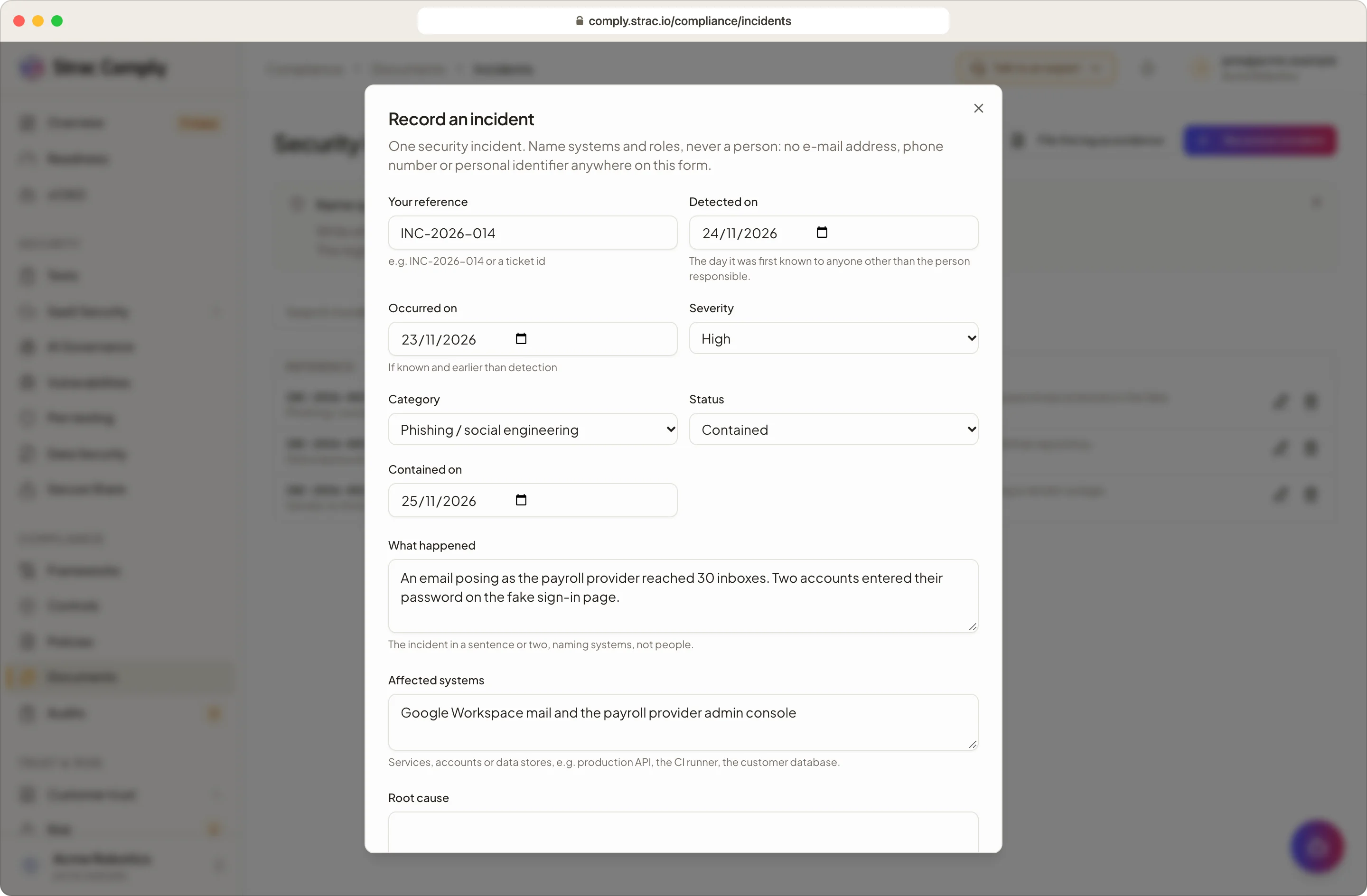
Step 1: Record an incident
Open the incident register and click Record an incident. Name systems and roles, never a person.
Admin
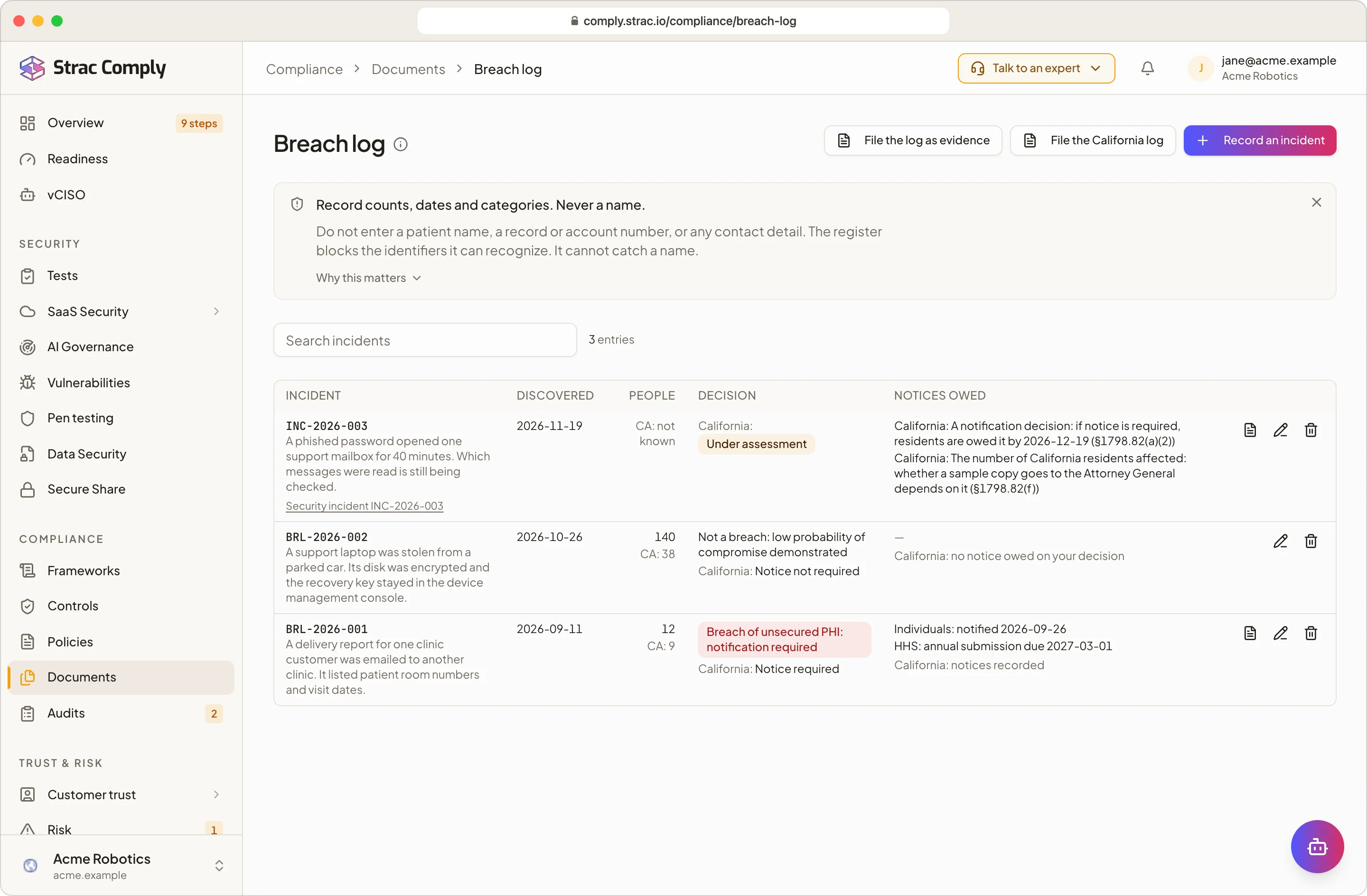
Step 2: Assess a breach
With HIPAA or CCPA on, click Breach notice on the incident. Record how many people were affected and your notice decision.
Admin
Step 3: Track privacy requests
Open the request tracker and click Record a request. Strac Comply works out the dates for requests you handle yourself.
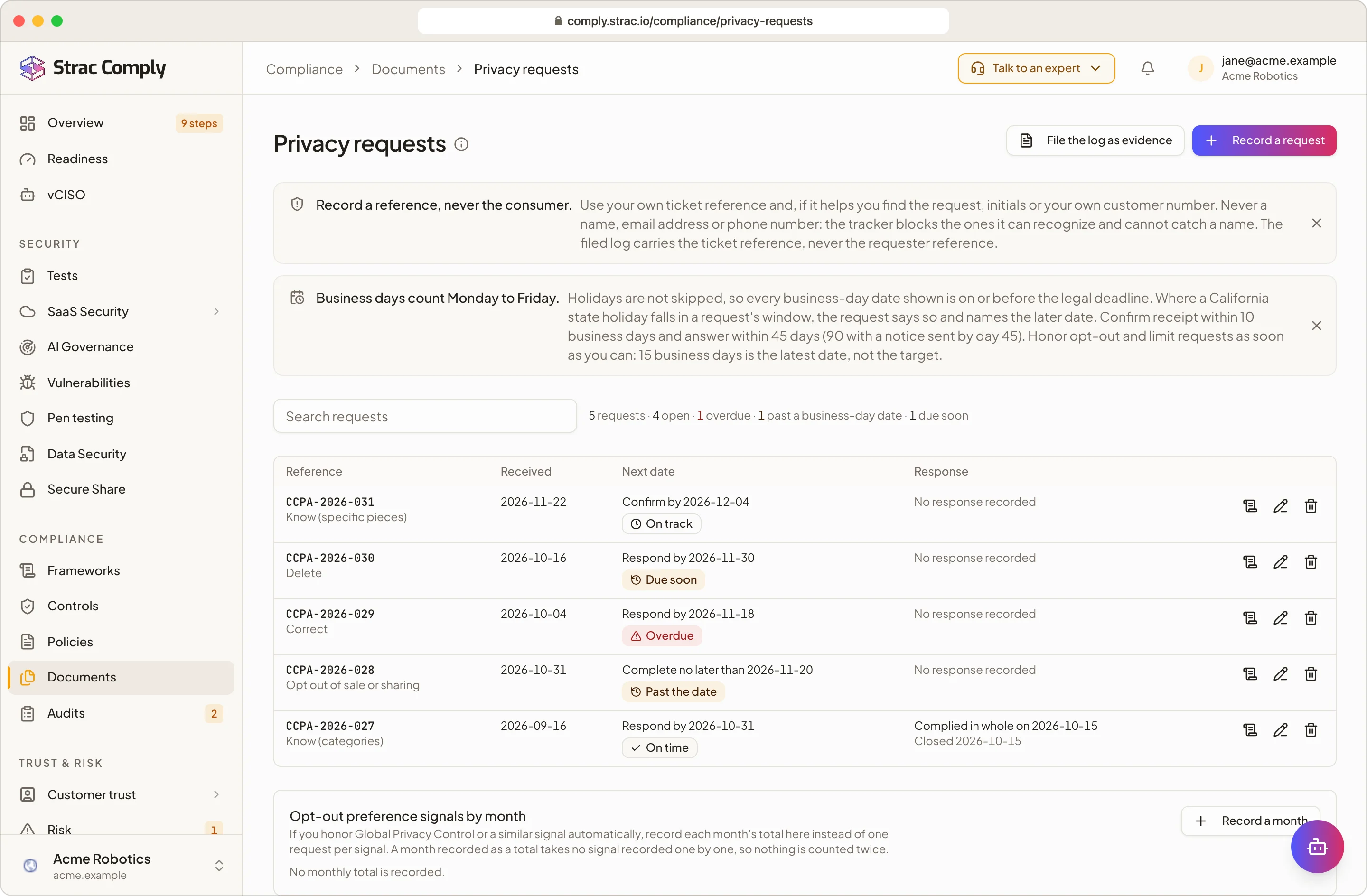
At the end of a period, click File the log as evidence, or File the California log for California breaches. Strac Comply saves a draft version of the document, or points you to an identical version already filed. You publish it on the document page.
Nothing recorded yet? File the empty incident, California breach or request log under your own attestation, so the period is on record. An empty incident log covers at least a full year. An empty HIPAA breach log files as of the day you file it.
What does each register record?
| Register | What you record | Dates it works out |
|---|---|---|
| Security incidents | Detection date, severity, category, status, what happened, root cause, containment and corrective actions | None. Dates must run in order, and closing an incident needs its root cause. |
| Breach log, HIPAA | The four factor risk assessment, your determination and each notice date | A covered entity tells individuals within 60 days of discovery. For 500 or more people, HHS is told at the same time. For fewer, within 60 days after the year ends. Over 500 residents of one state or jurisdiction also means notice to the media. A business associate tells the covered entity within 60 days. |
| Breach log, California | Residents affected, encryption, your notice decision and each notice date | Record your notice decision first. When notice is required under Civil Code 1798.82, the owner or licensee tells residents within 30 days of discovering or being told of the breach. If more than 500 residents must be told, a sample goes to the Attorney General within 15 days of that notice. If you hold the data for its owner, tell the owner right away. |
| Privacy requests | Request type, channel, verification, response and each date | Confirm requests to know, delete or correct within 10 business days. Answer within 45 calendar days, or 90 if you need more time and tell the consumer why by day 45. Requests to access automated decisionmaking information, and appeals of its decisions, use the same two dates. Opt outs of sale or sharing, and limits on sensitive data, as soon as you can, 15 business days at most. If an automated decisionmaking opt out arrives before you start that processing, do not start it. Once started, stop within the same 15 business days. A business that used automated decisionmaking for significant decisions before 2027 must follow its rules by January 1, 2027. Opt ins get no date. A request handled as a service provider gets none either, so confirm the deadline with your business customer. |
Each date is the usual outer limit the law allows. Send notice without unreasonable delay, and sooner if a contract asks. A recorded delay, such as a law enforcement hold, changes the status but not the date, so read both. You send each notice yourself and record its date. If you own or license California data, Strac Comply drafts a Notice of Data Breach you can copy.
Business days count Monday to Friday. Holidays are not skipped. Act on an opt out as soon as you can, at once when possible.
While CCPA is on, Strac Comply checks the tracker each day and sends up to 10 owners and admins a digest when there is news. An open date can appear when it comes within 5 days and again when it passes. Click Stop reminders on the tracker to turn it off.
Keep people out of the registers.
Which controls do the registers cover?
The incident register files the Incident Report / Root Cause Analysis document, which counts toward these controls.
| Framework | Controls |
|---|---|
| SOC 2 |
|
| ISO 27001:2022 |
|
| NIST CSF 2.0 |
|
| HIPAA Security Rule |
|
The breach log files the Breach Log and Risk Assessments document for HIPAA and the California breach notice log for CCPA.
| Framework | Controls |
|---|---|
| HIPAA Breach Notification Rule |
|
| CCPA |
|
The request tracker files the Consumer request log and the Annual consumer request metrics for CCPA.
| Framework | Controls |
|---|---|
| CCPA |
|
Codes use each framework's own numbering: SOC 2 Trust Services Criteria, ISO/IEC 27001:2022 Annex A and NIST CSF 2.0. HIPAA codes cite the Security Rule for incidents and the Breach Notification Rule for breaches. CCPA codes cite the CCPA regulations and California's breach notice law, Civil Code 1798.82.
Frequently asked questions
Where is the incident register?
Open Compliance > Documents and the Incident Report / Root Cause Analysis document. Click Open the incident register. Only owners and admins can open it.
Does Strac Comply send breach notices for me?
No. You send each notice and record its date. If you own or license California data, Strac Comply drafts a Notice of Data Breach text you can copy or download.
Can my ticketing tool fill the register?
No. You record incidents and requests by hand. You can also upload an incident report from your ticketing tool to the document.
What if we had no incident this year?
If your register has no entries, click File the empty log as evidence and state that none was found. Your attestation covers at least a full year. If it holds earlier incidents, click File the log as evidence.
How long are privacy requests kept?
11 CCR 7101 asks you to keep them for at least 24 months. The tracker counts from when a request closes, and Strac Comply never removes one on its own. You can delete one recorded in error at any time, or a closed one after 24 months. Each deletion needs a reason and leaves a trace.
Do I owe the yearly request figures?
Only if you know or should know you reach 10,000,000 or more California consumers in one calendar year. That counts buying, selling or sharing their personal information, or receiving or making it available for commercial purposes. If you do not, answer No in your CCPA scope, and the tracker says they are not owed. A data broker has its own yearly reporting duty.
Questions that apply to every guide, such as who needs an account, are in the guides FAQ.
Next steps
- Documents and registersSee every document your audit asks for, and the other registers Strac Comply keeps.
- CCPA / CPRASee how each California requirement is evidenced, including requests and breaches.
- HIPAA Security RuleSee the safeguards and breach notification rules and their evidence.
New to Strac Comply? Start free trial.